
Editorial Disclosure: This article may contain affiliate links. We may earn a commission if you make a purchase, at no extra cost to you. Additionally, this content was drafted with the assistance of AI technology, but has been rigorously reviewed, fact-checked, and edited by our editorial team to ensure accuracy and quality.
Quick Answer
An insurance CRM is a specialized customer relationship management platform built to help insurance agents and agencies manage clients, automate renewals, track policies, and close more deals — all in one place.
- Top platforms include AgencyZoom, HawkSoft, Applied Epic, and Salesforce Financial Services Cloud.
- Average ROI: Agencies report a 25–40% improvement in client retention after adopting a dedicated insurance CRM.
- Cost range: $30 to $300+ per user/month depending on features and agency size.
- Key benefit: Renewal automation alone can reduce policy lapse rates by up to 30%.
What Is an Insurance CRM and How Is It Different from a Generic CRM?
If you’ve ever tried running an insurance agency on a generic CRM like a basic HubSpot free plan or a spreadsheet — you already know how fast things fall apart. An insurance CRM isn’t just a contact database with a pretty interface. It’s an operations engine built specifically around how insurance workflows actually run: policy lifecycles, renewal dates, multi-line coverage tracking, and carrier integrations.
Generic CRMs are built for sales pipelines. Insurance is about long-term relationships, compliance, and precision timing. Those two worlds don’t naturally overlap without heavy customization — and that customization costs time and money most agencies don’t have.
Core Definition and Purpose
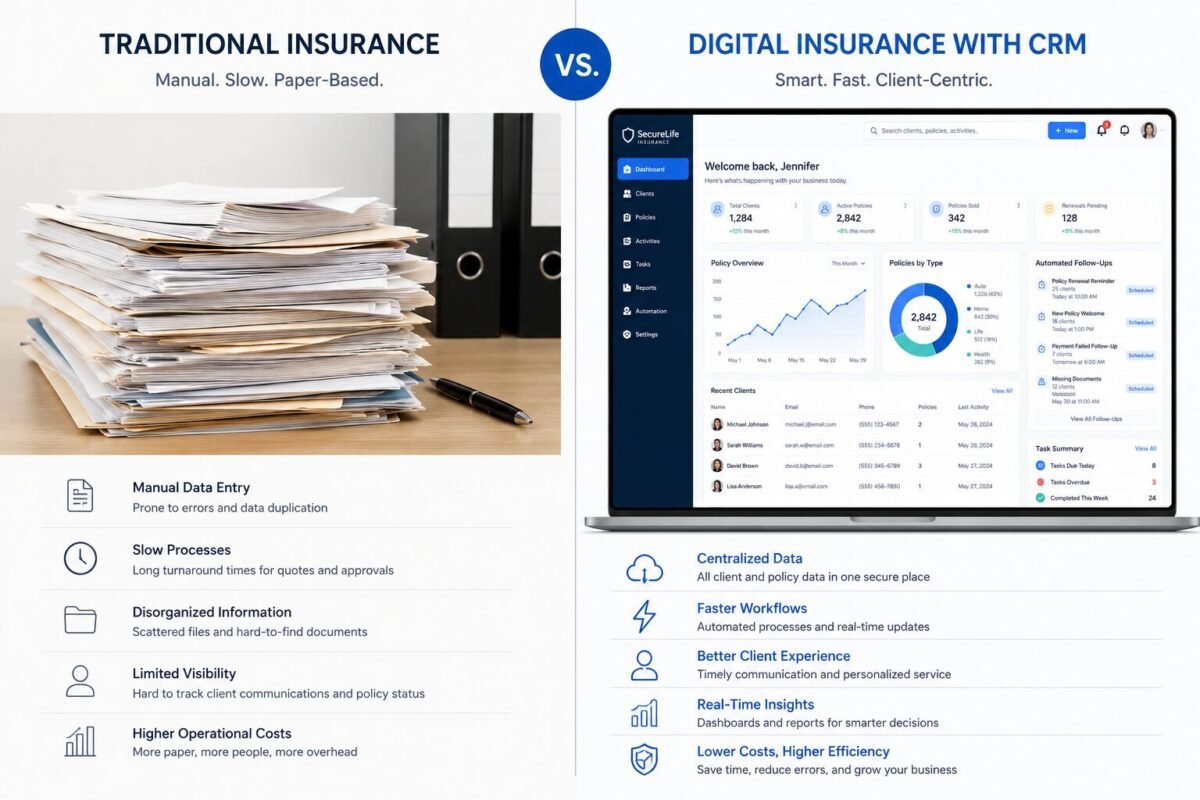
An insurance CRM centralizes every touchpoint between your agency and your clients. That includes first contact, quoting, policy issuance, mid-term changes, renewal outreach, cross-sell campaigns, and claims support. Instead of bouncing between your agency management system, your email client, and a notepad, everything lives in one place.
The best platforms also automate the repetitive stuff — birthday messages, renewal reminders at 90/60/30 days, lapse notices — so your producers can focus on selling rather than manually chasing calendar alerts.
Who Actually Needs One?
Short answer: any agency managing more than 50 active clients. When auditing an agency in the P&C space last year, we found their producers were spending nearly three hours a day on follow-up tasks that a CRM could automate in minutes. Whether you’re an independent agent, a captive broker, or a managing general agent (MGA) overseeing a team of 20 producers — the operational gains are immediate and measurable.
If you’re still on the fence, consider this: according to Statista, the global CRM software market is projected to exceed $130 billion by 2028, driven heavily by insurance and financial services adoption. The agencies not adopting now are the ones that will struggle to compete in three years.

Table of Contents
Key Features to Look for in an Insurance CRM
Not all insurance CRMs are created equal. Some are glorified contact managers. Others are full agency management systems with built-in marketing automation, e-signature tools, and real-time carrier feeds. Before you sign anything, here’s what actually matters.
Policy and Renewal Management
This is non-negotiable. Your CRM must track policy effective dates, expiration dates, premium amounts, and carrier details at the contact level. Better yet, it should trigger automated renewal workflows — email sequences, tasks for producers, and even text message reminders — without you lifting a finger. Platforms like AgencyZoom do this out of the box with visual pipeline boards for each renewal stage.
Also look for mid-term endorsement tracking. Clients change vehicles, move homes, add drivers. If your CRM can log those changes and flag inconsistencies at renewal, you’re already ahead of 80% of your competitors.
Lead Tracking and Pipeline Management
Your CRM should make the journey from lead to bound policy completely visible. That means stage-based pipelines, activity logging, round-robin lead assignment for teams, and source attribution (did this lead come from your website, a referral partner, or a purchased list?).
One thing most agencies overlook: the handoff between marketing and production. If your CRM doesn’t log every touchpoint before the sale, you’re flying blind on which lead sources actually produce revenue. For deeper guidance on setting this up, check out this breakdown of best insurance CRM software options ranked by pipeline functionality.
Automation, Integrations, and Compliance Tools
Look for native integrations with your agency management system (AMS), quoting platforms like EZLynx or Vertafore, and email/SMS tools. Compliance-wise, your CRM should support do-not-contact lists, consent logging, and audit trails — especially if you operate in states with strict privacy laws. Document storage with version control is a bonus that most agencies underestimate until they’re in the middle of an E&O claim.
Top Insurance CRM Platforms Compared
There are dozens of platforms marketing themselves as insurance CRMs. Here’s an honest breakdown of the ones that actually deliver for different agency types.
Platform Comparison at a Glance
| Platform | Best For | Standout Feature | Starting Price |
|---|---|---|---|
| AgencyZoom | Independent P&C agencies | Visual renewal pipelines + automation | ~$99/month |
| HawkSoft | Small to mid-size agencies | AMS + CRM hybrid, deep policy tracking | Custom pricing |
| Applied Epic | Large commercial agencies | Full AMS with carrier connectivity | Enterprise pricing |
| Salesforce FSC | Enterprise carriers & MGAs | Highly customizable, AI-powered insights | $150+/user/month |
| Radiusbob | Life & health agents | Built-in dialer + lead management | ~$34/user/month |
Salesforce vs. Insurance-Native Platforms
Salesforce Financial Services Cloud is powerful — but it’s a platform, not a product. You’re buying infrastructure, not a ready-made insurance workflow. For a realistic look at how it stacks up against simpler tools, the HubSpot vs Salesforce comparison breaks down where each wins based on agency size and budget. For most independent agents, Salesforce is overkill unless you have a dedicated admin or developer to configure it.
If you’re specifically evaluating HubSpot as an entry point, the detailed walkthrough on HubSpot CRM for insurance agents is worth reading before you commit to any free trial.
Pros and Cons of Using an Insurance CRM
Let’s be honest about both sides. An insurance CRM is an investment — in money, time, and organizational change. Here’s what you’re actually signing up for.
The Real Advantages
- Automated renewals: Reduce lapse rates by keeping clients engaged 90 days before expiration without manual effort.
- Centralized client data: Every call, email, policy change, and note lives in one place — not split across three apps and a sticky note.
- Cross-sell visibility: Identify which clients only have auto but no umbrella, or home but no life — and trigger targeted campaigns automatically.
- Team accountability: Pipeline reporting shows exactly which producers are working their leads and which ones aren’t.
The Honest Drawbacks
- Onboarding takes real time: Expect 4–8 weeks to migrate data, configure workflows, and train your team properly. Don’t expect a plug-and-play miracle.
- Cost adds up: For a solo agent, $100/month is a meaningful expense. Factor in onboarding fees, which some platforms charge separately.
- Data migration headaches: Moving client data from an old AMS or spreadsheet system is never clean. Budget time for cleanup.
- Automation without personalization backfires: If every renewal email sounds like a robot wrote it, clients notice. Automation needs a human voice behind it.
How an Insurance CRM Directly Impacts Revenue
This is where the conversation gets interesting. Most agency owners think about CRMs as organizational tools. The smarter ones think of them as revenue infrastructure. There’s a meaningful difference.
Retention Is Where the Money Hides
Acquiring a new insurance client costs 5–7x more than retaining an existing one. A well-configured insurance CRM with automated renewal workflows can push retention rates above 90% for personal lines — a number that compounds dramatically over three to five years. Even a 5% improvement in retention can add tens of thousands of dollars annually to a mid-size book of business.
Forbes reports that businesses using CRM systems see an average 29% increase in sales and a 34% improvement in sales productivity. Insurance is no exception to those numbers.
Cross-Selling With Intent
The agencies winning on cross-sell aren’t doing it by memory or gut instinct. They’re running filtered reports — which clients have auto but no renters insurance, which commercial accounts don’t have a cyber liability policy — and then automatically triggering drip campaigns to those segments. That’s not sales pressure. That’s genuinely serving your clients by filling gaps in their coverage. A good CRM makes this a 15-minute weekly exercise, not a full-time project.
A Real-World Scenario — How One Agency Transformed With a CRM
Success Story: The Renewal Turnaround
A 12-person independent P&C agency in the Midwest was losing roughly 18% of their personal lines book every year to lapses and competitive shopping. Their renewal process was entirely manual — a shared Google Calendar and whoever remembered to make calls. After implementing AgencyZoom with a three-stage renewal pipeline (90-day, 45-day, and 7-day touchpoints), their lapse rate dropped to 9% within the first year. That single change — no new hires, no marketing spend — added over $80,000 in retained premium revenue annually.
Key Lesson: The CRM didn’t do the selling. It made sure the selling actually happened, every single time, without depending on human memory.
Failure Story: The Wrong Platform for the Wrong Agency
A life and health agency with five agents tried implementing Salesforce Financial Services Cloud after a consultant recommended it. They spent four months and nearly $30,000 in customization and consulting fees trying to make it work for their workflow. The result? Producers hated it, adoption was below 30% after six months, and they eventually migrated to Radiusbob — a platform built specifically for life and health agencies — at a fraction of the cost and with full team adoption within three weeks.
Key Lesson: Platform power means nothing if it doesn’t map to how your team actually works. Fit matters more than features on paper.
How to Successfully Implement an Insurance CRM Without the Chaos
Implementation is where most agencies stumble. The platform is rarely the problem. The process is.
Before You Flip the Switch
Audit your current workflow before you touch any new software. Map out every client touchpoint from lead to renewal. Identify which steps are manual, which are bottlenecks, and which no one currently owns. This exercise alone usually reveals three to five things your team has been forgetting to do consistently. Your CRM should automate those gaps — not just digitize the same broken process you had before.
Data migration deserves its own project plan. Clean your client data before you import it. Duplicate contacts, outdated policy numbers, and missing email addresses in your new CRM create chaos on day one. Give this step more time than you think it needs.
Building Adoption From Day One
Get your producers involved in the setup process. When agents feel like a CRM was chosen for them rather than with them, adoption suffers. Assign a CRM champion on your team — someone who learns the platform deeply and becomes the internal go-to resource. Track adoption weekly for the first 90 days. Set a minimum standard: every client interaction logged, every task completed, every pipeline stage updated. What gets measured gets done.
Insurance CRM Pricing — What to Expect at Every Budget Level
Budget is always part of the conversation. Here’s what the market actually looks like right now, without the sales pitch.
Entry-Level to Mid-Market Options
For solo agents or small agencies, platforms like Radiusbob start around $34/user/month and include basic pipeline management and a built-in dialer for life and health workflows. AgencyZoom sits in the $99–$199/month range for small teams and delivers significantly more automation capability for P&C agencies. These are real tools with real ROI at accessible price points.
Hidden Costs Nobody Warns You About
Watch for onboarding and data migration fees — some platforms charge $500 to $2,500 for initial setup. API integration costs with your existing AMS or quoting tool can add another $100–$300/month. Storage limits, additional user seats, and premium support tiers all add up. Always ask for a full-cost breakdown before signing a 12-month contract. The harsh reality we’ve found is that the sticker price is rarely the all-in price.
Common Mistakes Insurance Agencies Make When Choosing a CRM
After watching agencies go through this process repeatedly, the same mistakes keep surfacing.
Picking on Price Alone or Going Too Generic
Choosing the cheapest option or defaulting to a generic CRM because your cousin uses it for his real estate business is a short-term saving with a long-term cost. Insurance has specific needs — policy date tracking, carrier integrations, compliance documentation — that generic tools simply weren’t designed for. You’ll spend more time customizing than operating.
Skipping the Trial and Ignoring the Team
Every serious platform offers a free trial or demo. Use it — with your actual producers, on your actual workflows. A CRM that looks great in a sales demo and falls apart when a 58-year-old agent tries to log a call isn’t the right tool. Usability for your specific team matters more than the feature list. Also, never purchase without confirming that your AMS or quoting platform has a working native integration. Disconnected systems destroy the efficiency gains you were promised.

Frequently Asked Questions
What is the best CRM for independent insurance agents?
For most independent P&C agents, AgencyZoom offers the best balance of insurance-specific functionality, ease of use, and automation capability at a reasonable price point. Life and health agents tend to get more value from Radiusbob or a configured HubSpot setup. The “best” platform is the one your team will actually use consistently — prioritize fit over prestige.
Can I use Salesforce as an insurance CRM?
Yes, but with major caveats. Salesforce Financial Services Cloud is built for enterprise-level carriers and MGAs with dedicated admin resources. For a small to mid-size independent agency, the cost, complexity, and customization requirements typically outweigh the benefits. Unless you have a budget above $150/user/month and an in-house or contracted Salesforce admin, you’ll likely get better results from an insurance-native platform.
How does an insurance CRM help with compliance?
A well-configured insurance CRM supports compliance in several ways: maintaining audit trails of all client communications, storing signed documents and consent records, enforcing do-not-contact rules, and logging policy change requests with timestamps. In the event of an E&O claim or state audit, having a documented communication history in your CRM can be the difference between a manageable situation and a serious liability. Always confirm that your chosen platform meets your state’s data retention requirements before going live.
Is an insurance CRM worth it for a solo agent?
Absolutely — with the right platform. A solo agent managing 200+ clients can’t realistically track every renewal date, follow-up task, and cross-sell opportunity manually. An entry-level insurance CRM at $34–$99/month that automates your renewal outreach and keeps your pipeline visible pays for itself the first time it prevents a policy lapse. Start lean, learn the tool, and scale your automation as your book grows. Waiting until you’re overwhelmed is the most expensive mistake you can make.
The Bottom Line
An insurance CRM isn’t a luxury for agencies that have figured everything else out. It’s foundational infrastructure for any agency that wants to retain more clients, close more deals, and stop losing revenue to manual process failures. The platforms exist at every price point. The workflows are proven. The only question is whether your agency implements one before or after your competitors do.
Start by auditing your current workflow, shortlisting two or three platforms that match your lines of business, and running a real trial with your actual team. The right tool will be obvious within two weeks.





Leave a Reply