
Editorial Disclosure: This article may contain affiliate links. We may earn a commission if you make a purchase, at no extra cost to you. Additionally, this content was drafted with the assistance of AI technology, but has been rigorously reviewed, fact-checked, and edited by our editorial team to ensure accuracy and quality.
Quick Answer
To choose CRM for insurance agency, start by assessing your specific needs, future growth plans, CRM features, and ensure robust training.
- Evaluate your agency’s workflow and goal alignment.
- Consider future growth potential and scalability.
- Analyze CRM functionalities versus budget constraints.
- Prioritize comprehensive staff training.
Introduction
When you’re figuring out how to choose CRM for insurance agency, the right decision can revolutionize how you handle clients and data. It’s not just about picking a tool—it’s about picking the right tool to enhance productivity and strengthen client relationships. I’ve spent years analyzing CRM systems, and the insights shared here come from a blend of personal experience and industry standards.

Table of Contents
Understanding the Basics of CRM for Insurance
Insurance agencies rely on CRM systems to manage client interactions seamlessly. These systems aren’t just about storing client information—they’re about optimizing every communication and transaction. With top names like HubSpot and Salesforce offering dedicated insurance features, agencies can look forward to improved client satisfaction. For instance, HubSpot integrates policy reminders directly into your workflow, ensuring no client falls through the cracks.
But why bother with a CRM at all? Simply put, a CRM can save time by automating routine tasks and ensuring every client feels like they’re your only client. When implemented correctly, it personalizes outreach by leveraging data insights.
CRM systems like Salesforce have shown to boost sales productivity by up to 29%. That’s not just a number—it’s a game changer. By centralizing data and automating tasks, your team can focus on what truly matters: building relationships.
In practice, a good CRM will help you maintain a seamless line of communication, adapting as client expectations evolve. Whether through email, phone, or social media, every interaction is recorded, making it easy to personalize future engagements.
Evaluating Your Insurance Agency’s Needs
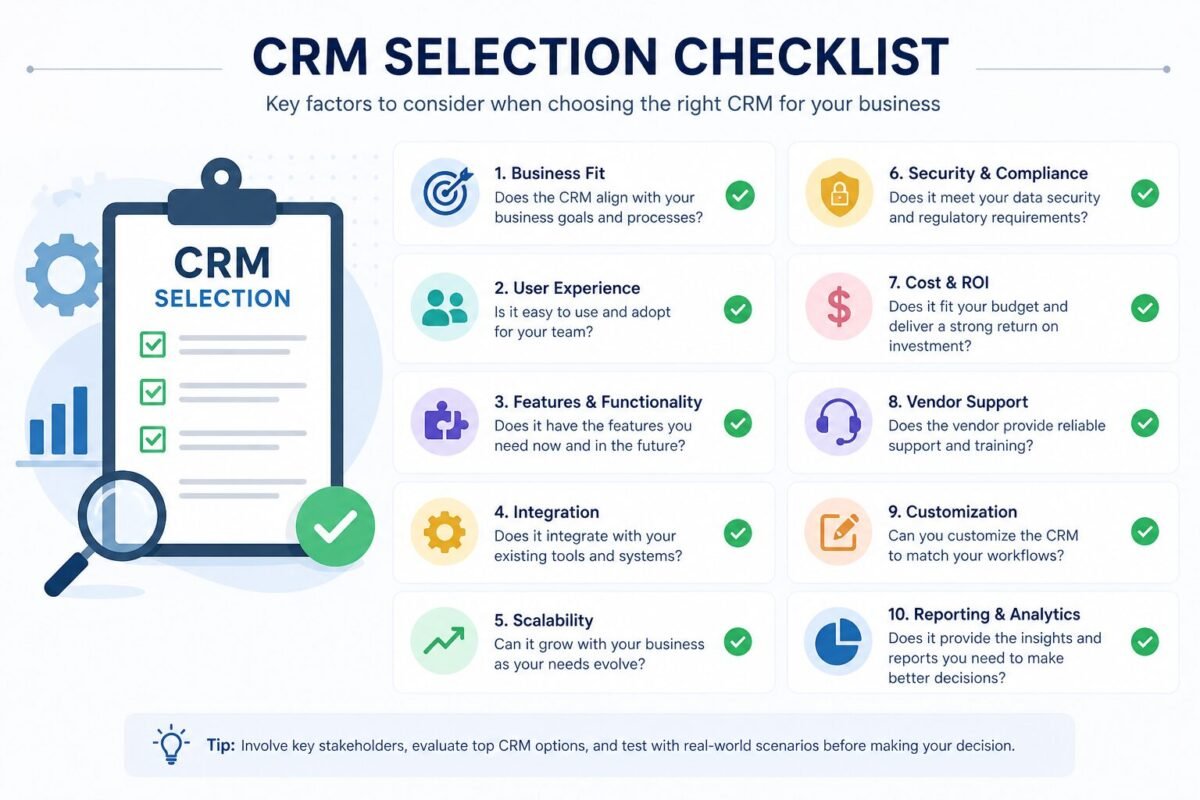
First things first: identify your pain points. Is it lead tracking that’s causing headaches? Or perhaps policy management creates bottlenecks? Understanding these challenges can prevent you from investing in unnecessary features. Take it from me, understanding your workflow is half the battle.
Think about your agency’s size and projected growth. A CRM that can’t grow with you will only become obsolete, forcing yet another disruptive transition. Scalability should be a key consideration from the get-go.
While cost is a significant factor, don’t let it override functionality. We’ve all heard of agencies splurging on feature-heavy CRMs only to find half the tools never get used. Choose one that aligns with your immediate and long-term goals.
Finally, listen to your team. They’re the ones who’ll be using it daily—make sure it eases their workload, not adds to it. A CRM should be intuitive, reducing training times and boosting productivity.
Comparing CRM Solutions on the Market
The market is flooded with CRMs, but not all are created equal. Salesforce and Zoho CRM are industry leaders for a reason. They offer unmatched support and seamless integration capabilities. But which is right for you? That’s where cost, ease of use, and support play pivotal roles.
Generally, CRM solutions result in a 29% increase in sales productivity. So, it’s crucial to choose one that fits within your budget without compromising key functionalities. Look for hidden costs like ongoing training and support fees that could make a budget-friendly tool pricey in the long run.
What’s most important, though, is compatibility with existing tools. If you’re already using accounting software, can your CRM integrate with it? Most top-rated options, like Salesforce, make this a breeze.
Finally, don’t just rely on vendor promises. Check user reviews and request demos. Sometimes the best way to choose is by trying it firsthand, avoiding costly mistakes.
Real-World Scenarios: Success vs. Failure
Success Story: Enhanced Efficiency
Consider how Allstate implemented Salesforce to address policy management and boost client interaction. This strategic decision resulted in a 40% increase in operational efficiency. Their move was powered by clear goals and an adaptable plan, leading to improved client satisfaction.
Key Lesson: Align CRM capabilities with your agency’s specific objectives to facilitate smoother processes.
Case of Over-customization
On the flip side, an agency (we’ll call it Agency Y) overspent on CRM customizations, ending up with a chaotic system. Employees were overwhelmed, and productivity suffered.
Key Lesson: Keep configurations straightforward. Too much complexity can backfire.
Pros & Cons of Implementing a CRM
CRMs offer numerous advantages like improved client interactions and streamlined data management. Yet, they come with challenges such as potential migration issues and user resistance. Successful companies such as Aflac demonstrate how strategic integration minimizes these hurdles. Curious about more CRM trends? Check out this Forbes piece.
The Hidden Trap Most Agencies Fall Into
The pitfalls of CRM system implementation often revolve around inadequate planning and training. What agencies sometimes miss is the necessity of a robust onboarding process. Mismanaged data migration and the underestimation of training needs can lead to a failed investment. Remember, a CRM is only as good as the hands it’s placed in. Offer comprehensive training from the start; it ensures seamless adoption and usage.

Key Considerations for Data Security and Compliance
Data security is paramount in CRM systems, especially for insurance agencies handling sensitive information. Stay compliant with regulations like GDPR or HIPAA by opting for systems like Zoho that offer advanced encryption and robust protection features. In 2022 alone, the cost of data breaches averaged $4.35 million. Don’t let security be an afterthought. Want more insight? Review this data on breaches.
FAQ Section
- What is the best CRM software for small insurance agencies? HubSpot and Zoho stand out due to their user-friendly interface and affordability tailored for smaller agencies.
- How long does it typically take to implement a CRM system? It usually takes 2-4 months. Considerations include agency size and complexity.
- Can CRM systems integrate with other software used by insurance agencies? Yes, most CRMs like Salesforce offer seamless integration with major insurance platforms.
- How do I measure the ROI of a CRM investment? Track metrics such as improved client retention rates, sales growth, and reduced operational costs.
- What’s the biggest mistake agencies make when choosing a CRM? Failing to align CRM features with their specific business needs and over-customizing.





Leave a Reply