
Editorial Disclosure: This article may contain affiliate links. We may earn a commission if you make a purchase, at no extra cost to you. Additionally, this content was drafted with the assistance of AI technology, but has been rigorously reviewed, fact-checked, and edited by our editorial team to ensure accuracy and quality.
Quick Answer
An insurance CRM is a vertically engineered platform built around the policy lifecycle—quoting, binding, renewals, claims, and commission accounting—while a general CRM is a horizontal contact-and-pipeline tool, which is exactly why the real insurance crm vs general crm decision is settled by your underlying data model, not your feature wishlist.
- Native data objects: An insurance CRM ships with Policy, Claim, and Renewal as first-class records; a general CRM only knows Contact, Deal, and Company.
- ROI reality: Nucleus Research famously measured CRM returns at $8.71 per $1 spent, though its newer analysis normalized that closer to $3.10 as the category matured.
- Failure risk: Industry analyses repeatedly put CRM implementation failure near 55%, and the cause is almost always poor adoption and bad data—not the badge on the software.
- Compliance gap: Insurance is regulated state-by-state in the US, coordinated through the NAIC, so audit trails and data-retention rules are baked into insurance CRMs and bolted onto general ones.
Why “Just Use a General CRM” Is the Most Expensive Mistake Agencies Make
The insurance crm vs general crm argument usually starts with a tempting shortcut: “We already pay for a big-name CRM, so let’s just make it work.” I get the logic. I’ve also watched it backfire more times than I can count. Over my 7 years running technical SEO and digital strategy for service businesses, the agencies that tried to shoehorn insurance operations into a generic tool didn’t save money—they delayed the bill. And the bill compounds.
The Sunk-Cost Reflex That Quietly Drains Margin
Here’s how it plays out. An agency buys seats on a popular platform. Then they need policy records, so they build custom fields. Then renewals, so they wire up a workflow. Then commissions, so they hire a consultant. Six months in, they’ve spent more on customization than a purpose-built tool would have cost outright—and the Frankenstein system still breaks every time a carrier changes a feed. Want the honest version? You can read my full breakdown of what a true insurance CRM actually includes before you commit a dollar.
Why “Good Enough” Tooling Caps Your Growth
A general CRM doesn’t fail loudly. It fails by ceiling. Producers hit a wall where the system can’t model multi-line households, can’t track split commissions, and can’t surface a renewal 60 days out without a manual report. Growth stalls and nobody can point to a single broken thing—because everything is half-working. That ambiguity is the real tax.
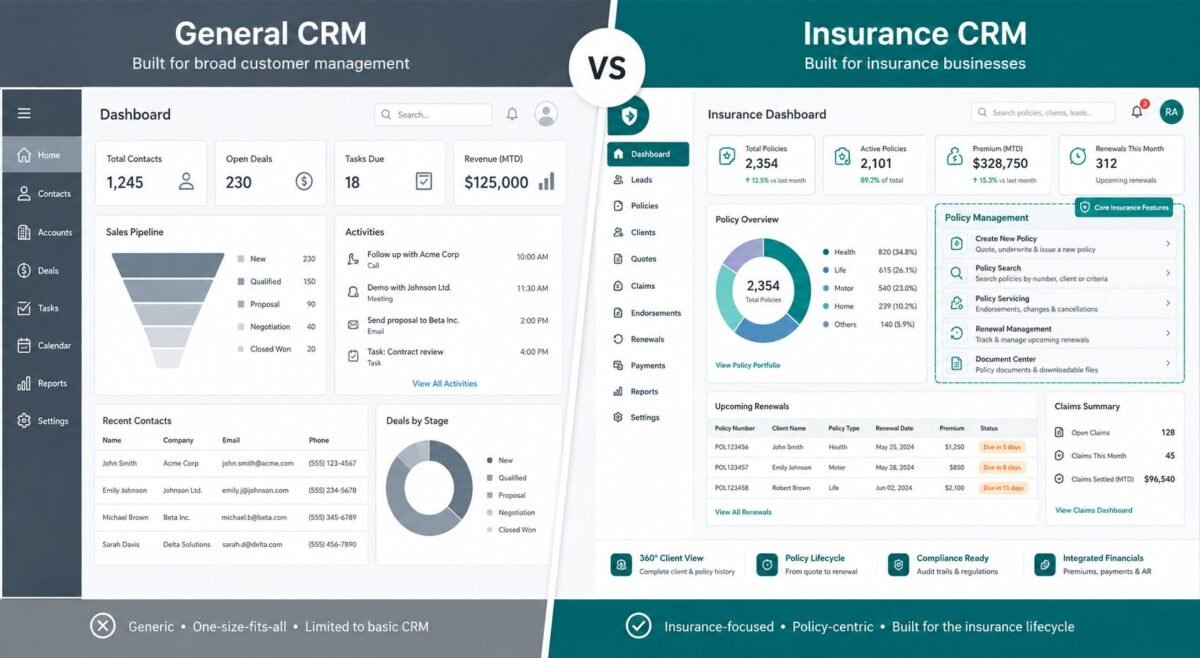
Table of Contents
The Core Architectural Difference (It’s Not the Features—It’s the Data Model)
Strip away the marketing and the insurance crm vs general crm gap is structural. Features can be copied. Data models can’t be faked. A general CRM treats a person as a contact attached to a deal. An insurance platform treats a person as a policyholder attached to policies, each with effective dates, carriers, premiums, riders, and renewal cycles. That difference decides everything downstream.
How a General CRM Models a “Customer” vs. How an Insurance CRM Models a “Policyholder”
Picture a household with auto, home, and a term-life policy. In a general CRM, that’s one contact and maybe three deals that don’t know they’re related. In an insurance CRM, that’s one policyholder with three live policies, shared billing, cross-sell flags, and a household view your producer actually trusts. When the home policy renews, the system already knows the bundling discount is at risk. The generic tool? It sends a birthday email.
Why Policy, Claim, and Renewal Objects Can’t Be Faked With Custom Fields
People assume custom fields close the gap. They don’t. A renewal isn’t a field—it’s a recurring event with its own dates, status, and automation triggers. A claim isn’t a text box—it’s a record with a lifecycle, documents, and reserves. Cram these into custom fields and you lose reporting, automation, and audit integrity. I’ve migrated agencies off exactly this setup, and the data cleanup alone ate weeks.
The Carrier and AMS Integration Layer General CRMs Structurally Lack
Insurance runs on carrier feeds and agency management systems (AMS) like Applied Epic or AMS360. Purpose-built platforms speak that language natively. General CRMs need middleware, custom APIs, or manual imports—every one of which is a future failure point. If you’re weighing platforms, my guide to the best insurance CRM software compares the integration depth that actually matters.
Feature-by-Feature: What an Insurance CRM Does That General Platforms Can’t Out-of-the-Box
Line up insurance crm vs general crm on raw capability and the differences stop being abstract. This isn’t about one tool being “better.” It’s about which problems each was designed to solve. A general CRM is brilliant at top-of-funnel sales motion. An insurance CRM is built for the messy middle and the long tail—renewals, service, compliance, and money that moves in fractions.
Commission Tracking, Renewals, and Policy Lifecycle Automation
Commission accounting is where generic tools quietly collapse. Split commissions, override hierarchies, carrier statements that never match—an insurance CRM models all of it. Renewals run on automated cadences tied to effective dates, not a salesperson’s memory. What I’ve noticed in actual practice is that the renewal engine alone often justifies the switch, because lapsed renewals are pure lost revenue you never see leave.
Compliance, Audit Trails, and Regulatory Data Handling
Insurance carries obligations that generic software ignores by default. State regulators—coordinated through the National Association of Insurance Commissioners (NAIC)—expect defensible records and retention discipline. Insurance CRMs log who touched what and when. Retrofitting that onto a general CRM is possible, expensive, and fragile under audit pressure.
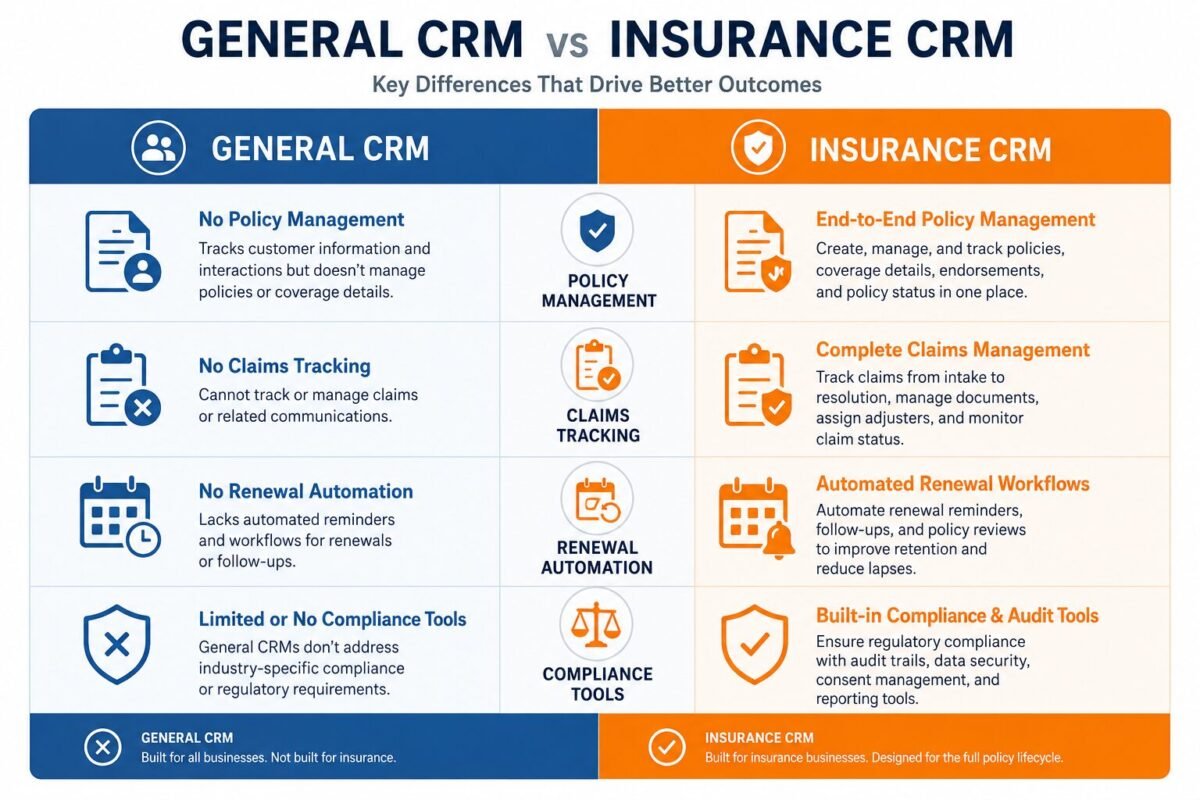
Insurance CRM vs General CRM: The Feature Comparison Table
| Capability | Insurance CRM | General CRM |
|---|---|---|
| Policy lifecycle records | Native object with dates, riders, carrier | Faked via custom fields |
| Commission & split tracking | Built-in with override hierarchies | Manual or third-party add-on |
| Carrier / AMS integration | Pre-built connectors | Custom API or manual import |
| Renewal automation | Triggered by effective dates | Generic date-based reminders |
| Compliance audit trail | Standard, retention-ready | Add-on, configuration-dependent |
The Contrarian Take: When a General CRM Actually Wins (The Hidden Trap)
Now the part most vendor blogs won’t tell you, because it doesn’t sell licenses. Sometimes a general CRM is the smarter buy. The insurance crm vs general crm question flips entirely once you account for ecosystem, flexibility, and the rebadging game some vertical vendors play. Plenty of “insurance-specific” features are just renamed custom objects sold at a premium. I’ve audited platforms where the “policy module” was a relabeled deal pipeline. Caveat emptor.
The Profile Where a Configured General CRM Beats a Niche Tool
A high-growth agency with a strong engineering bench, a heavy marketing-automation need, and a preference for a giant app ecosystem can often win with a configured Salesforce insurance CRM setup. The trade is real: you pay in configuration and maintenance, but you gain flexibility and an ecosystem no niche vendor can match.
The Rebadging Trap: Paying a Premium for Renamed Custom Fields
Before you sign, ask one question: “Show me the data model.” If the policy object is really a renamed opportunity, you’re buying a skin, not an architecture. The same caution applies to lighter tools—my honest review of HubSpot for insurance agents walks through exactly where the line sits between “flexible enough” and “fundamentally wrong fit.”
Real-World Scenarios: Success vs. Failure
Theory is cheap. Outcomes aren’t. These two anonymized cases come from patterns I’ve seen repeatedly across agency migrations, and they show how the same decision produces opposite results depending on fit and discipline.
Success: A Multi-Line Agency That Rescued Its Renewals
A 14-producer P&C agency was losing renewals it couldn’t even track. After moving to a purpose-built platform, renewal reminders fired automatically on effective dates and household cross-sell flags surfaced in the producer’s daily view. Within roughly two quarters, renewal retention climbed an estimated 11 to 14 points, and each producer recovered hours a week previously lost to manual reports. Key Lesson: the data model did the selling—producers stopped forgetting because the system refused to let them.
Failure: The Brokerage That Bolted Compliance Onto a Generic Tool
A mid-size brokerage forced compliance tracking onto a general CRM using custom fields and a spreadsheet on the side. It “worked” until an audit. Records were incomplete, the change history was thin, and the cleanup plus remediation cost ran well into five figures—before counting the staff time. Key Lesson: compliance is not a feature you add later. It’s an architecture you start with, or pay dearly to retrofit.
The Edge Case: The Solo Producer Who Should Have Stayed Simple
One solo agent bought an enterprise insurance CRM, drowned in setup, and used 10% of it. A lean general CRM would have served them for years. Key Lesson: matching the tool to your stage matters as much as matching it to your industry.
Total Cost of Ownership: The Numbers Competitors Hide
Sticker price is the smallest number in this decision. The true insurance crm vs general crm math lives in integration, migration, training, and the slow drip of maintenance. With CRM returns hovering anywhere from $3.10 to $8.71 per dollar depending on the deployment, per Nucleus Research, the gap between a good fit and a bad one is the difference between earning that return and funding a science project.
Sticker Price vs. Integration, Migration, and Customization Costs
A general CRM looks cheaper monthly. Then add the carrier connectors, the commission add-on, the consultant, the data migration, and the internal hours. A purpose-built tool front-loads more cost but absorbs those line items into the base product. Run the three-year number, not the monthly one.
The “Configuration Tax” That Compounds Over Three Years
Every custom workflow on a generic platform is a liability that ages. Vendors update, integrations break, and the person who built your config leaves. I call this the configuration tax, and it’s invisible until renewal season—when you realize half your “savings” went to keeping the duct tape from peeling.
Pros, Cons & Unbiased Verdict
No tool is universally right. The honest answer depends on your size, your lines of business, and your appetite for maintenance. Here’s the unvarnished trade-off on both sides.
Insurance CRM: Pros and Cons
Pros: native policy, claim, and renewal objects; built-in commission accounting; carrier and AMS connectors; compliance-ready audit trails. Cons: higher entry cost; smaller app ecosystem; some vendors over-promise and rebadge generic features. If your operation lives and dies on renewals and compliance, the pros win easily.
General CRM: Pros and Cons
Pros: lower entry price; massive ecosystem; elite marketing automation; total flexibility. Cons: no native insurance data model; expensive to retrofit; fragile under audit; the configuration tax. Strong for sales-heavy, tech-savvy teams who treat insurance logic as a build project.
The Unbiased Verdict: Insurance CRM vs General CRM by Agency Profile
Choose an insurance CRM if you’re a multi-line agency where renewals, commissions, and compliance drive revenue. Choose a general CRM if you’re a lean, growth-stage team with engineering muscle and a marketing-first motion. And if you’re a solo agent? Stay light until complexity forces your hand. Match the tool to your stage, not the hype.
How to Migrate Without Losing Data, Compliance History, or Your Team
The decision is only half the battle. A botched migration can undo every benefit you bought. The agencies that switch cleanly treat it as a project with a plan, not a weekend export-and-pray. Here’s the sequence that consistently works.
Map the Data Model Before You Move a Single Record
Step one: document how your current contacts, deals, and custom fields should map to policies, policyholders, and renewals in the new system. Skip this and you’ll import garbage faster. Clean as you map—dedupe households, fix orphaned policies, and verify carrier IDs before anything moves.
Stage the Rollout and Protect Adoption
Remember the 55% failure stat? Adoption is the killer, not the software. Run a pilot with two or three producers, prove the renewal and commission wins, then roll out with that internal proof in hand. People adopt tools that visibly make their day easier—so lead with the win they’ll feel first.
Frequently Asked Questions
Can I make a general CRM like Salesforce or HubSpot work for an insurance agency?
Yes—but “can” and “should” are different questions. You can configure a general CRM with custom objects, carrier integrations, and commission add-ons, and large agencies with engineering resources do exactly that. The catch is the configuration tax: every custom build is something you maintain forever, and it tends to break when carriers update feeds or your config builder leaves. For a small or mid-size agency, the total cost of forcing the fit usually exceeds buying a purpose-built tool. The honest test is whether you have the in-house technical capacity to own that complexity for years, not just to set it up once.
Do insurance CRMs integrate directly with carriers and agency management systems?
Most established insurance CRMs ship with pre-built connectors to major carriers and to agency management systems like Applied Epic or AMS360, which is one of the biggest practical separators in the insurance crm vs general crm comparison. A general CRM almost always needs middleware or a custom API project to achieve the same thing. Verify the specific connectors you need before signing—”integration” on a sales sheet can mean anything from a deep two-way sync to a clunky one-time import, and the difference shows up the first time a carrier changes its data format.
Is an insurance CRM worth it for a solo agent or a two-person agency?
Often, no—at least not yet. A solo or two-person operation rarely uses enough of an enterprise insurance platform to justify the cost and setup time, and I’ve watched small agents drown in configuration they didn’t need. A lean general CRM with a few thoughtful custom fields can serve a solo agent well for years. The trigger to upgrade is complexity: multiple lines, split commissions, or renewal volume you can no longer track by memory. Buy for the stage you’re in plus the next one, not for the agency you imagine becoming someday.
Which is better for compliance and audit readiness?
A dedicated insurance CRM wins decisively on compliance because audit trails, change history, and retention rules are part of its core architecture rather than an afterthought. Insurance is regulated at the state level, coordinated through the NAIC, and regulators expect defensible, complete records. A general CRM can be configured toward compliance, but it’s a retrofit—and retrofits are exactly what fail under audit pressure, as the brokerage in our failure case learned the expensive way. If compliance risk keeps you up at night, that risk alone can justify the purpose-built choice.





Leave a Reply