
Editorial Disclosure: This article may contain affiliate links. We may earn a commission if you make a purchase, at no extra cost to you. Additionally, this content was drafted with the assistance of AI technology, but has been rigorously reviewed, fact-checked, and edited by our editorial team to ensure accuracy and quality.
Quick Answer
Insurance CRM automation for agents is the use of rule-based software triggers to run repetitive sales and service work — lead routing, follow-up sequences, renewal reminders, and data entry — without manual effort, freeing producers to spend their hours on the conversations that actually bind policies.
- Speed is the whole game: the MIT/InsideSales Lead Response Management Study found a lead contacted within 5 minutes is 21x more likely to qualify than one reached at 30 minutes.
- The ROI is documented: Nucleus Research measured returns of $8.71 for every $1 spent on CRM — among the highest of any software category.
- Your competitors are slow: Harvard Business Review found the average firm needs 42 hours to answer a web lead, and 23% never reply at all.
- Automation has a hard ceiling: the emotionally charged touchpoints — a denied claim, a rate increase, a death benefit — must stay human, or you trade efficiency for churn.
Insurance CRM automation for agents isn’t really a software decision. It’s a decision about which parts of your day a machine should own, and which parts it must never be allowed to touch. Most agencies get that split backwards. They automate the warm, human moments that build loyalty, and then they handle the cold, mechanical busywork by hand. That’s the exact inversion of what works.
I’ll show you how to flip it. We’ll walk through the workflows worth automating first, the integrations that quietly decide whether your stack helps you or fights you, a contrarian take on where automation actively backfires, and a straight verdict on whether any of this pays off for a solo shop versus a 20-producer agency. No filler. Just mechanics.
What Insurance CRM Automation for Agents Actually Means in 2026
Forget the vendor brochures. Strip it down. This is a set of if-this-then-that rules wired into the system that already holds your book of business. A lead fills out a quote form. The system tags it, assigns it, texts the prospect, and drops a task on a producer’s screen — before anyone has touched a keyboard. That’s the whole idea. The hard part isn’t the technology. It’s deciding what to trigger and when.
Core Components — From Lead Capture to Renewal
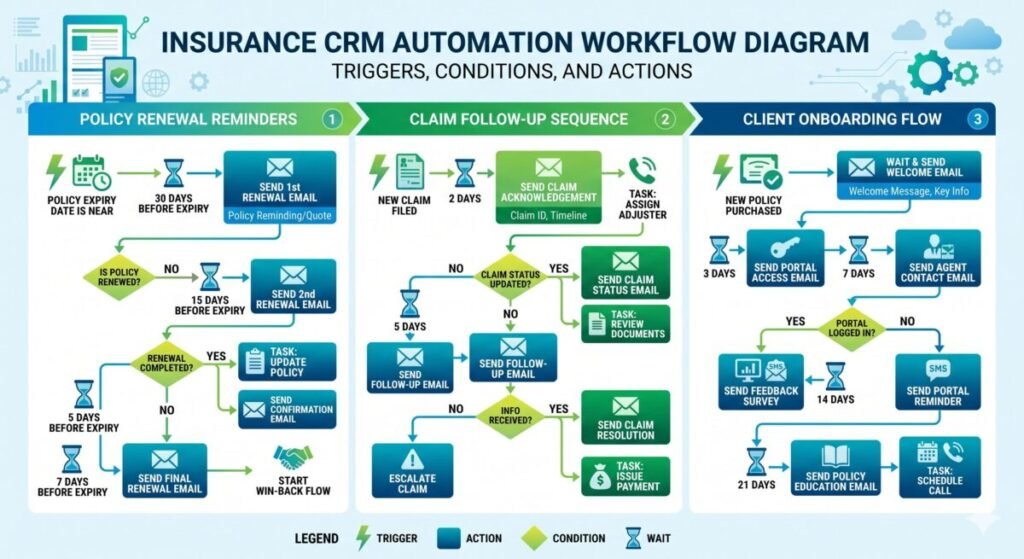
Every automated agency runs on four moving parts: capture (web forms, call tracking, lead-vendor feeds), routing (who gets the lead, instantly), nurture (the sequences that keep cold prospects warm), and retention (renewal and cross-sell triggers). Picture a commercial auto lead landing at 9:14 p.m. on a Saturday. A manual shop sees it Monday. An automated shop has already sent a text, logged the source, and queued a call for 8:05 a.m. Same lead. Wildly different odds.
CRM vs. Agency Management System (AMS) — The Distinction That Trips Everyone
This confusion costs agencies real money. An AMS (think Applied Epic or AMS360) is your system of record — policies, endorsements, accounting, carrier downloads. A true insurance CRM is your system of growth — pipeline, lead scoring, and the follow-up engine. The AMS knows what a client has. The CRM knows what a prospect wants. You usually need both, talking to each other. Treating your AMS as a sales tool is why so many producers still chase renewals from spreadsheets.
What Actually Changes in a Producer’s Day
Over my seven years building digital systems for client businesses, the pattern is almost boringly consistent: the win isn’t “saving time,” it’s removing the decisions a tired human keeps getting wrong at 4:55 p.m. on a Friday. The producer stops asking “who do I call next?” The queue answers it. The producer stops forgetting the 90-day check-in. The trigger fires it. You don’t get a robot agent. You get an agent who never drops the ball on the boring stuff.
The High-Impact Workflows Every Agent Should Automate First
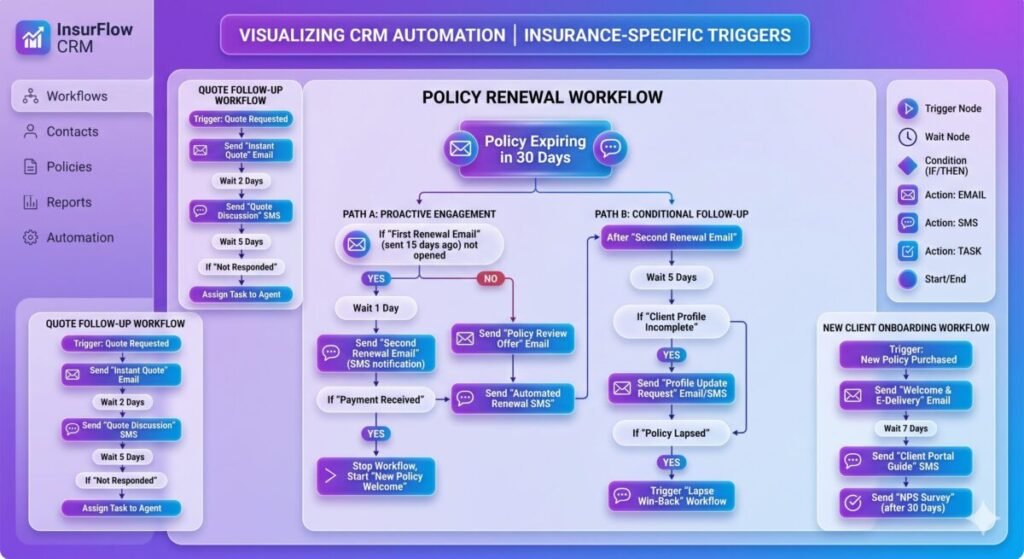
Don’t boil the ocean. If you automate everything at once, you’ll automate your mistakes faster. Start with the three workflows that move bind rate and retention the most, then expand. Here’s where I’d put the first dollar of insurance CRM automation for agents every single time.
Lead Intake, Routing & Speed-to-Lead (The 5-Minute Window)
Speed wins. Harvard Business Review audited 2,241 companies and found the average response to a web lead was 42 hours — and the study explicitly blamed pulling leads from a CRM database once a day instead of acting the moment they arrive. Automate this first: instant SMS acknowledgment, round-robin assignment to the right producer, and an escalation if no contact happens in 10 minutes. A prospect who quoted three carriers tonight will buy from whoever answers first. Often that’s the only differentiator.
Renewal Reminders & Policy-Lifecycle Triggers
Renewals are free money agencies leave on the table. Build triggers off the effective date: a 60-day pre-renewal review email, a 30-day “any life changes?” text, and a producer task if the policy is high-premium. Real scenario — a homeowner adds a pool in July, you never ask, and at renewal a competitor catches the coverage gap and the whole account walks. A lifecycle trigger catches that in spring. Retention is cheaper than acquisition, and these touches cost you nothing once they’re wired.
Drip Nurture Sequences for Cold, Warm, and Stalled Prospects
Not every lead is ready today. Most aren’t. A drip campaign keeps you present without manual chasing: a 5-email sequence for cold quotes, a faster cadence for warm prospects who opened twice, and a “did your situation change?” re-engagement for stalled deals at day 45. The point isn’t volume. It’s staying the obvious choice when intent finally spikes — which it does, weeks after the form fill, when you’ve long since stopped thinking about them.
Manual vs. Automated: Where the Hours Actually Go
This table compares how a typical small agency handles core tasks by hand versus on triggers. The numbers reflect what I see in real producer workflows, not vendor fantasy.
| Workflow | Handled Manually | Handled by Automation | Typical Impact |
|---|---|---|---|
| New lead first contact | Hours to next day; depends on who’s free | Under 5 minutes, any hour, every lead | Up to 21x higher qualify rate (5 min vs 30 min) |
| Renewal outreach | Remembered ad hoc; misses busy weeks | Fires on a fixed pre-renewal schedule | Fewer surprise lapses; higher retention |
| Cold lead follow-up | 1–2 attempts, then forgotten | 5–8 touches across weeks, automatically | Recovers deals that go quiet, not dead |
| Data entry & logging | Manual, inconsistent, often skipped | Auto-logged from forms and calls | Cleaner data, accurate reporting |
| Cross-sell prompts | Rare; relies on memory | Triggered by policy and life events | More monoline accounts become multiline |
Lead Scoring & Pipeline Intelligence — Stop Chasing the Wrong Prospects
More leads isn’t the goal. Working the right leads is. This is where insurance CRM automation for agents stops being a glorified autoresponder and starts acting like a second brain that ranks your pipeline so producers spend their best hours on the prospects most likely to bind.
Behavioral vs. Demographic Scoring Models
Demographic scoring ranks who someone is — age, ZIP, business type, coverage requested. Behavioral scoring ranks what they do — opened the quote three times, clicked the proposal, replied “what’s the deductible?” The second is far more predictive of intent. A lead who matches your ideal profile but never opens an email is colder than a “wrong-fit” lead who keeps clicking. Score both. Weight behavior heavier. Your gut will argue. The data usually wins.
Auto-Routing Hot Leads to the Right Producer
A hot commercial lead landing on your newest junior producer is a leak. Build routing logic: high-premium or complex risks go to senior producers, personal lines auto-distribute by round robin, and a Spanish-language form flag routes to a bilingual agent. Scenario — a $40k trucking account comes in at lunch, the system reads the premium band and pushes it to your commercial specialist with a priority alert, not into a shared inbox where it dies by 3 p.m.
Predicting Lapse Risk Before a Client Leaves
The best retention play is catching the leaver before they leave. Patterns predict it: a missed payment, a customer-service complaint, a sudden coverage-reduction request, no logins for months. Tag those as lapse-risk signals and fire a producer task automatically. A personal call before renewal — not after the cancellation request — saves accounts a renewal email never could. You’re not reading minds. You’re reading behavior the system already tracks.
Must-Have Integrations — Connecting Your CRM to the Rest of Your Stack
A CRM that doesn’t talk to your other tools becomes another silo you have to babysit. Integrations are where the real leverage lives, because they kill double entry and let triggers fire across systems. When you’re comparing the best insurance CRM software, judge it on what it connects to, not just its feature checklist.
Quoting Engines, Carrier Portals & Rating Tools
The dream is one entry point. A client’s details flow from the CRM into your comparative rater and back, no retyping. Without it, your producer keys the same name and VIN into four systems and fat-fingers one. Look hard at how a platform like Salesforce handles rating and carrier connections, because a broken handoff here turns “automation” into extra clicks — which is worse than doing nothing.
E-Signature, Payments & Document Management
Binding shouldn’t stall on paperwork. Wire e-signature so an application generates, sends, and files itself the moment a client says yes. Trigger payment links automatically. Auto-attach the signed docs to the right record. Scenario — a client agrees by text at 7 p.m., the app is signed on their phone by 7:08, and the coverage is bound while a manual agency is still printing forms for Monday. That’s eight minutes versus three days.
Email, SMS & Omnichannel Communication
Clients live in text now. A CRM that only does email is fighting last decade’s battle. You want SMS, email, and ideally WhatsApp logging into one timeline, so any producer can see the full thread instantly. The honest review of HubSpot for insurance agents is a useful reality check here — strong on omnichannel and reporting, but you’ll want to confirm the messaging fits your compliance setup before you scale outreach.
When Automation Backfires — The Over-Automation Trap Most Guides Ignore
Here’s the part the listicles skip. Automation has a ceiling, and crashing through it is how good agencies torch hard-won trust. After implementing insurance CRM automation for agents across very different shops, I use one rule that’s saved more relationships than any feature: the higher the emotional or financial stakes of a touchpoint, the less you automate it. Think of it as a traffic light.
The Touchpoints You Should Never Fully Automate
Green light — automate freely: lead acknowledgments, payment reminders, document requests, birthday notes. Yellow light — automate the trigger, humanize the message: large renewals, cross-sell offers, win-backs. Red light — never automate: claims, denials, rate increases, a death benefit, anything involving grief or bad news. A grieving spouse who gets a chirpy automated “How’s your policy serving you?” email will leave, and tell everyone why. Some moments demand a human voice. Full stop.
The “Uncanny Valley” of Fake Personalization
“Hi [FIRST_NAME], as a valued [POLICY_TYPE] customer…” Everyone can smell that now. Mechanical personalization is often worse than an obviously generic message because it pretends to be personal and fails. What I’ve watched happen in real accounts is that over-templated outreach quietly trains clients to ignore you. The fix isn’t more merge tags. It’s fewer, better-timed touches that reference something true — a real renewal date, an actual coverage gap — instead of faking intimacy at scale.
Dirty Data In, Compliance Violations Out
Scale a broken process and you scale the breakage. Automated SMS and email blasting straight into a list with bad numbers and no consent isn’t efficiency — it’s a TCPA or Do-Not-Call exposure multiplied by your send volume. Automation is an amplifier. Point it at clean, consented data and it compounds your wins. Point it at a messy list and it compounds your liability, one auto-sent text at a time. Clean the data before you turn up the volume.
Real-World Scenarios: Success vs. Failure
Theory is cheap. Here are two composite cases drawn from how these builds actually play out — one that worked, one that didn’t — with the numbers and the lesson that matters.
The Win — A 6-Producer Personal Lines Agency
They were losing internet leads to slow follow-up. We wired instant-SMS-plus-routing and a renewal-trigger sequence, and we left claims and tough renewals fully human. Inside one quarter, average first-response time dropped from roughly four hours to under five minutes, and bind rate on web leads climbed from about 9% to 14%. Key lesson: they didn’t automate more conversations — they automated speed, and protected the human moments that keep clients loyal.
The Failure — A Solo Agent Who Automated Everything
Eager and under-resourced, this agent switched on every sequence at once, including automated touches on claims and renewals, against an unscrubbed contact list. Within weeks, two long-term clients left after getting tone-deaf automated messages during a claim, and a chunk of texts bounced off dead numbers. The tool got blamed. The setup was the problem. Key lesson: automation without judgment and clean data doesn’t scale your agency — it scales your mistakes and your churn.
Pros, Cons & Unbiased Verdict — Is It Worth It for Solo and Small Agencies?
Let’s be honest about the tradeoffs, because the answer genuinely depends on your book size and your willingness to do the setup work. Insurance CRM automation for agents is not a magic bind-rate machine you switch on and walk away from.
The Genuine Upsides
The wins are real and measurable. Consistency — every lead gets followed up, every renewal gets touched, no exceptions, no human forgetting. Time reclaimed — producers stop doing data entry and start selling. Scalable follow-up — one agent can stay in front of hundreds of prospects without burning out. And the math backs it: Nucleus Research put CRM returns at $8.71 for every dollar spent, one of the best ratios in business software.
The Real Costs & Limitations Vendors Won’t Highlight
Now the part the sales rep glosses over. Setup is a real project, not a weekend — bad configuration produces bad automation at speed. Per-seat pricing creeps as you add producers, and the “starter” tier often lacks the integrations you actually need. There’s lock-in: migrating off a CRM once your data and workflows live inside it is painful. And if your data is dirty, you’re automating garbage. The tool amplifies whatever you feed it.
The Verdict — Who Should Automate Now, Who Should Wait
If I’m being honest about what actually moves the needle: a solo agent doing under ~15 quotes a month gets the most bang from a single lever — instant lead response — not a full platform yet. Agencies with two-plus producers and steady inbound lead flow are leaving money on the table without scoring, routing, and renewal triggers. The rough break-even is consistent lead volume that outpaces what a human can chase by hand. Below that, start with speed-to-lead alone and grow into the rest.
How to Roll Out Insurance CRM Automation for Agents Without Disrupting Your Book
The fastest way to fail is to flip every switch on day one. A phased rollout protects your existing clients while you build. Here’s the sequence I’d follow, and there’s a deeper walkthrough on how to set up a CRM for your agency if you want the step-by-step.
Audit Your Workflow & Clean Your Data First
Before automating anything, map what you actually do today and fix the data underneath it. Dedupe contacts. Kill dead numbers. Confirm consent on your list. Automating a broken, dirty process just breaks things faster and louder. This step is unglamorous and everyone wants to skip it — which is precisely why the agencies that do it pull ahead of the ones chasing shiny features.
Phased Rollout & Driving Adoption
Automate one workflow, prove it, then add the next. Start with speed-to-lead. Once that’s humming, layer in renewals, then scoring. For a team, adoption is everything — a CRM nobody updates is a very expensive spreadsheet. Make logging effortless, show producers their own numbers improving, and resist the urge to launch six sequences in week one. Slow is smooth. Smooth is fast.
Measuring ROI — The Metrics That Actually Matter
Vanity metrics lie. Track the three that predict revenue: speed-to-lead (are you under five minutes?), renewal retention rate (is automation actually saving accounts?), and cost-per-bound-policy (is the spend producing binds?). If response time falls and retention rises, your automation is working. If they don’t move after a fair trial, your triggers or your data are wrong — and you fix those before you blame the platform.
AI and the Next Frontier of Insurance CRM Automation
Rule-based triggers are table stakes now. The frontier is AI that reads context and drafts the work, not just fires a template. This is where insurance CRM automation gets genuinely interesting over the next couple of years — and where the over-automation rule matters more than ever.
AI-Drafted Follow-Ups, Call Summaries & Smart Replies
AI now drafts a tailored follow-up from the actual quote details, summarizes a 20-minute call into three bullet points and a next step, and suggests replies a producer can edit and send. Scenario — a producer finishes a discovery call, and before the next one starts, the CRM has logged the summary and drafted a recap email referencing the real coverage concerns. The producer reviews, tweaks, sends. Minutes saved, nothing dropped.
Predictive Cross-Sell and Upsell Triggers
Instead of guessing, AI flags the monoline auto client whose profile screams “needs an umbrella policy” and surfaces it with suggested talking points. It spots the renewing homeowner who just had a baby — life insurance opportunity — and prompts the producer at the right moment. The system does the pattern-matching across your whole book that no human has the bandwidth to do manually. You still make the call.
Where AI Still Needs a Human in the Loop
Don’t hand AI the keys to high-stakes moments. It can draft, summarize, and suggest brilliantly — and it still hallucinates, misreads tone, and shouldn’t be the one delivering a claim denial or a price increase unsupervised. Treat AI as a tireless assistant that prepares the work, with a licensed human reviewing anything that touches money, coverage, or emotion. The agencies that win pair AI’s speed with human judgment. They don’t replace one with the other.

Frequently Asked Questions
How much does insurance CRM automation cost for a small or solo agency?
It ranges widely, and the sticker price is the smallest part of the real cost. Entry-level CRMs with basic automation often run somewhere in the range of $25 to $75 per user per month, while insurance-specific platforms with carrier integrations and advanced workflows climb higher. But the line item that surprises people is implementation: the time to configure triggers, clean data, and train your team. A cheap CRM you set up wrong costs more than a pricier one configured well. For a true solo agent, I’d start lean — a single tool that nails instant lead response — and only graduate to a full platform once your lead volume clearly justifies the spend. Buy the workflow you need now, not the enterprise suite you might need in three years.
Can automation replace an agent’s personal follow-up, or does it hurt close rates?
It should replace your busywork, never your relationships — and that distinction decides whether it helps or hurts. Automation is unbeatable at the mechanical layer: instant acknowledgment, consistent reminders, logging, scheduling. Hand it those, and your close rate rises because you stop dropping leads. But the moment you let it impersonate genuine human connection on high-stakes touchpoints, close rates and retention fall, because clients can tell. The winning model is hybrid: let the machine guarantee speed and consistency, and reserve the actual conversations — the advice, the tough renewals, the claims — for you. Automate the logistics. Humanize the stakes. Get that right and automation amplifies your personal touch instead of replacing it with something hollow.
Is automated SMS and cold outreach to insurance leads TCPA and DNC compliant?
It can be, but automation makes compliance more dangerous, not less, because it scales whatever you’re doing. In the U.S., the Telephone Consumer Protection Act (TCPA) and Do-Not-Call rules govern automated texts and calls, and rules have been tightening around what counts as valid consent. Blasting an automated SMS sequence into a purchased list without documented opt-in is exactly the kind of mistake that turns into expensive complaints — multiplied by your send volume. Before you automate outreach: confirm consent, honor opt-outs instantly, scrub against DNC lists, and keep records. This isn’t legal advice, and I’m not an attorney — given how fast these rules move, have a compliance professional review your setup before you scale. Clean, consented data first. Volume second.
What’s the real difference between an insurance CRM and an AMS — do I need both?
They solve different problems, and conflating them is why so many agencies struggle to grow. An Agency Management System (AMS) is your operational system of record — it manages active policies, endorsements, accounting, and carrier downloads for clients you already have. An insurance CRM is your growth engine — it manages prospects, pipeline, lead scoring, and the follow-up automation that turns inquiries into clients. The AMS looks backward at what’s on the books; the CRM looks forward at what could be. Most growing agencies need both, integrated so data flows between them without double entry. Trying to force your AMS to do sales follow-up is a common, costly mistake — it’s built for servicing existing business, not for the fast, automated nurture that modern lead generation demands.
The Bottom Line
Automate the admin. Keep the relationship. That one principle settles ninety percent of the decisions you’ll face. If you do nothing else this week, fix your speed-to-lead — get every new lead a real response inside five minutes — because it’s the single highest-return move available to you. Then layer in renewal triggers and lead scoring as your volume grows. Skip the high-stakes touchpoints. Clean your data before you scale. The agencies pulling ahead aren’t the ones with the most automation. They’re the ones who automated the right things and protected the human moments that no trigger can replace.





Leave a Reply