
Editorial Disclosure: This article may contain affiliate links. We may earn a commission if you make a purchase, at no extra cost to you. Additionally, this content was drafted with the assistance of AI technology, but has been rigorously reviewed, fact-checked, and edited by our editorial team to ensure accuracy and quality.
Quick Answer
If you’re working out how to set up CRM for insurance agency operations, the short version is this: it’s a five-step build—map your lead-to-renewal pipeline, choose a policy-aware platform, migrate and de-duplicate client data, configure renewal automation, then connect your AMS, quoting engine, and communication tools.
- Build order matters: wire up the renewal engine first, not lead capture. Renewals are where agencies actually make money.
- Pick policy-aware software: a policy-centric data model (carriers, coverage lines, effective and expiry dates) beats a contact-only CRM every time.
- Adoption beats features: roughly 55% of CRM rollouts miss their goals—and the cause is poor user adoption, not the software.
- The payoff: a 5% retention lift can raise profits 25–95%, and CRM has historically returned around $8.71 for every $1 spent.
Here’s the part most guides skip. Knowing how to set up CRM for insurance agency growth isn’t a software-picking exercise—it’s a data and behavior problem wearing a software costume. I’m Adnan, and across seven years of building digital systems for client businesses, the agencies that win aren’t the ones with the prettiest tool. They’re the ones who got the boring parts right. Let’s get into the parts your competitors are quietly fumbling. You can also start with this primer on what an insurance CRM really does before you commit.
Why a Generic CRM Quietly Bleeds Insurance Agencies Dry
Let’s kill a myth. Any popular horizontal CRM will work for an agency, right? Wrong. Most general-purpose tools were built around a single object: the contact. One person, one record, one deal. But insurance doesn’t work like that. A single household can hold an auto policy, a home policy, an umbrella, and a life rider—each with its own carrier, premium, renewal date, and commission split. Force that into a flat contact list and you get a mess that looks organized for about three weeks. Then it rots.
What I’ve watched in actual practice is that the leak isn’t dramatic. It’s slow. A missed renewal here. A duplicate there. An expiry date nobody flagged. None of it shows up on a dashboard, which is exactly why it’s so expensive. This is the core reason the insurance CRM vs a general CRM debate isn’t really close once you understand the data shape.
From contact records to a policy-centric data model
A contact-centric CRM answers “who is this person?” A policy-centric data model answers “what does this person own, with whom, and when does it lapse?” That second question is the entire business. When you set up CRM for insurance agency workflows correctly, every client record becomes a parent that holds multiple child records—policies—each carrying coverage line, carrier, effective date, expiry date, and premium. Picture a client named Sarah. In a generic CRM, Sarah is one row. In a policy-aware system, Sarah is one client with four linked policies, three carriers, and four separate renewal clocks ticking independently. Which version helps your producer call her before her competitor does?
The compliance and licensing fields generic tools ignore
Now the part that gets agencies sued. Generic CRMs have no native concept of producer licensing, E&O documentation, or state-by-state appointment tracking. So agencies bolt on a “notes” field and pray. That’s a trap. A licensed producer writing business in a state where their appointment lapsed isn’t a data hygiene problem—it’s a regulatory one. When you set up CRM for insurance agency compliance, you need dedicated fields for license numbers, expiration dates, NPN, and carrier appointments, with automated alerts before anything expires. Build it in from day one. Retrofitting it after an audit notice is a special kind of misery.
Generic CRM vs Insurance-Specific CRM at a Glance
| Capability | Generic CRM | Insurance-Specific CRM |
|---|---|---|
| Core data object | Contact / deal | Client with linked policies |
| Renewal tracking | Manual reminders | Automated by expiry date |
| Carrier & coverage lines | Custom fields (fragile) | Native, structured |
| Producer licensing & E&O | Notes field workaround | Dedicated fields + alerts |
| AMS integration | Rare or custom-built | Pre-built connectors |
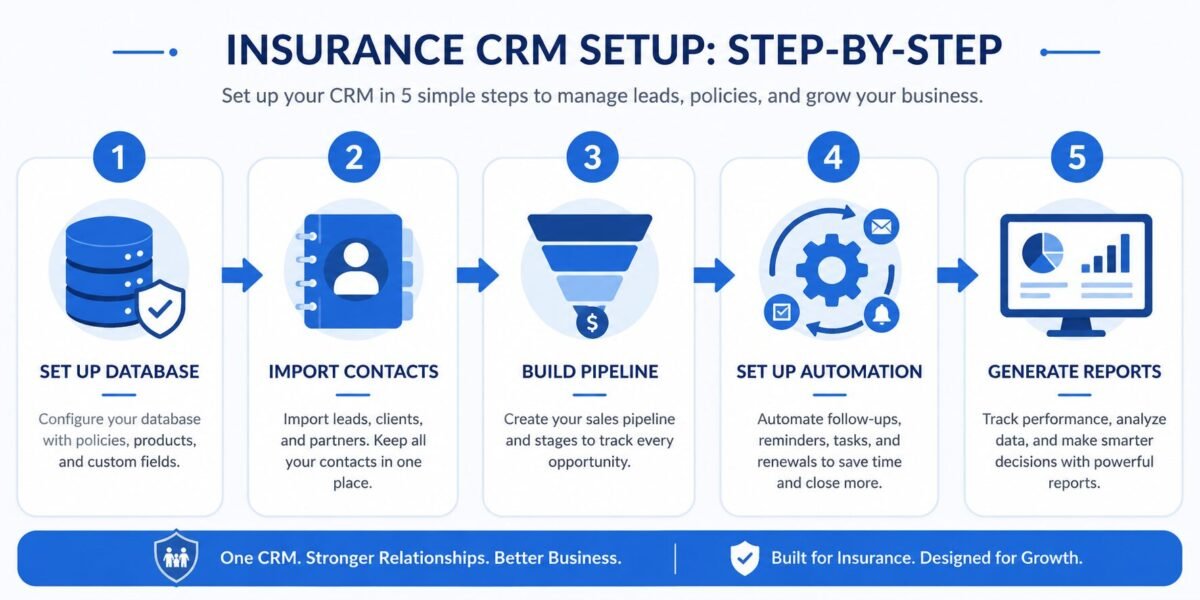
Table of Contents
Before You Touch the Software: Mapping Workflow, Data & Compliance
Here’s where the 3-week rollout splits from the 6-month disaster. The agencies that fail almost always skip this phase because it’s unglamorous. No demos. No shiny pipeline view. Just mapping. But this is the phase that decides everything. You cannot configure a system around a process you haven’t written down, and “it’s all in my head” is not a process—it’s a liability. Before you set up CRM for insurance agency operations, you map three things: the workflow, the data, and the compliance layer.
Think of it like plumbing. Nobody admires the pipes. Everybody notices the flood.
Auditing your real lead-to-policy-to-renewal pipeline
Sit down and trace one real client’s full journey. Not the idealized version—the actual one. Where did the lead come from? Who touched it first? What happened between quote and bind? Who owns the renewal? You’ll find gaps you didn’t know existed. In one audit I ran, a producer was getting quote requests through a personal cell number that touched no system at all. Those leads were invisible to the agency. Map every stage: lead → quote → bind → policy → renewal → cross-sell. Each stage needs an owner, a trigger, and a next action. If you can’t name those three things for a stage, that’s your weak point.
Cleaning, de-duplicating, and structuring legacy client data for migration
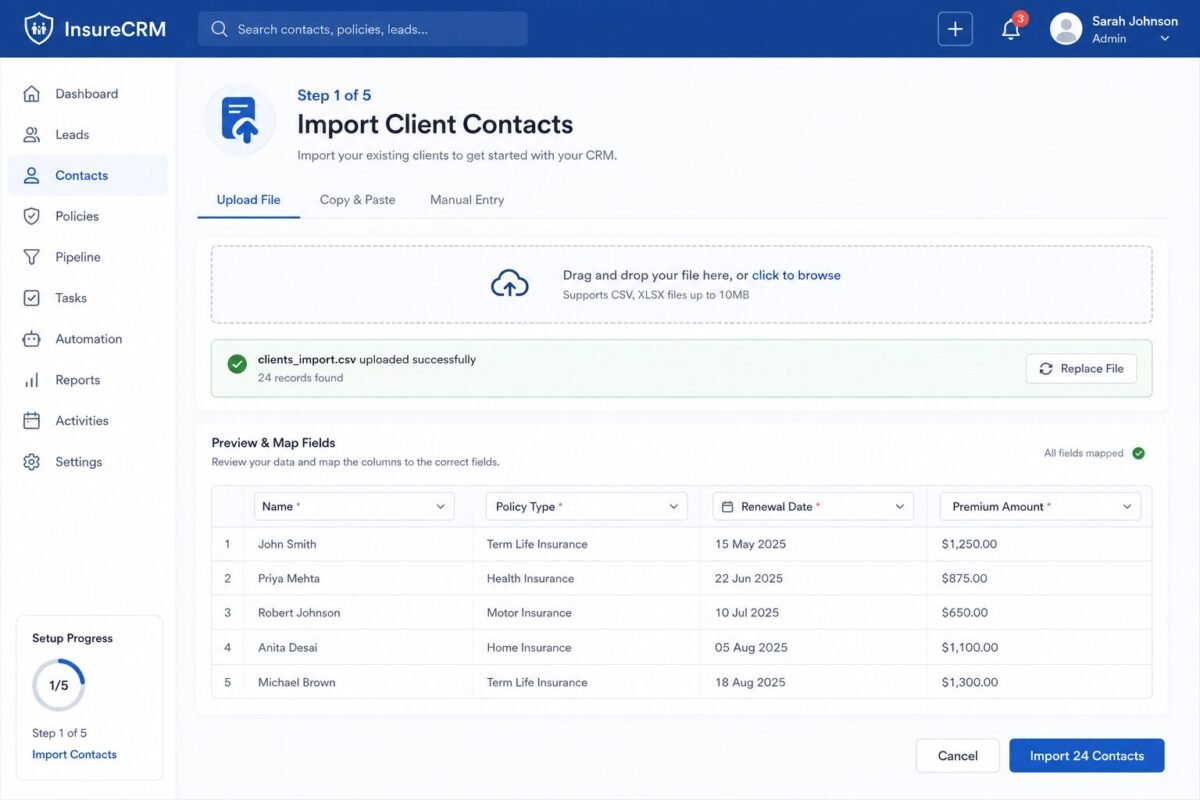
Your old data is dirtier than you think. Mine usually is. Before migration, run a hard de-duplication pass—merge the three “John Smith” records, standardize phone formats, fix the policies attached to the wrong household. Garbage in, garbage forever. A clean migration of 800 accurate records beats a sloppy dump of 2,000. I’d rather an agency launch with verified data than a bloated database nobody trusts, because the moment producers stop trusting the data, they stop using the system. And then you’ve got a very expensive address book.
Defining compliance, E&O, and producer-licensing data fields
Before the build, list every compliance field you’re legally required to track and every field that protects you in an E&O dispute. Documented advice. Coverage rejections signed by the client. Communication timestamps. These aren’t nice-to-haves. When a client claims “nobody told me flood wasn’t covered,” your CRM record is your defense. Structure these fields now so every producer captures them the same way, every time.
How to Set Up CRM for Insurance Agency: The Step-by-Step Build
Mapping done? Good. Now we build. This is the procedural core—the part you can actually execute this week. The goal isn’t to configure everything at once. It’s to build a foundation that holds weight. Most teams rush the build and over-configure, creating 40 custom fields nobody fills in. Resist that. Start lean. When you set up CRM for insurance agency operations, fewer required fields means higher adoption, and adoption is the whole game. If you’re still choosing a platform, compare your options against this breakdown of the best insurance CRM software first.
Configuring custom objects for policies, carriers, and coverage lines
Step one: create the structure. Build a Policy object that links to each client and holds carrier, coverage line, premium, effective date, expiry date, and status. Build a Carrier reference list so producers select from a clean dropdown instead of typing “Progressive,” “progressive,” and “Progessive” into three different records. Standardized inputs today save you a data-cleanup nightmare next year. This single structural choice is what separates a real insurance CRM from a contact list with ambition.
Designing pipeline stages: quote to bind to renewal to cross-sell
Your pipeline should mirror the real journey you mapped earlier—not a generic sales funnel. Build stages for quote requested, quoted, bound, active policy, renewal due, and cross-sell opportunity. Here’s the contrarian bit: most guides tell you to obsess over the front of the funnel. I tell agencies to build the renewal and cross-sell stages first, because that’s where your existing book quietly prints money. A new lead is a maybe. A renewal is a near-certainty if you simply show up.
Setting roles, permissions, and producer/CSR territory ownership
Decide who sees and edits what. A CSR servicing a book needs different access than a producer hunting new business, and a principal needs a view across everything. Assign clear record ownership so leads don’t sit in a no-man’s-land where everyone assumes someone else is handling it. Ambiguous ownership kills more deals than bad pricing. If two people own a lead, nobody does.
Automating Renewals, Retention & Lead Follow-Up (The Revenue Engine)
This is the section that pays for the whole project. Automation in an insurance CRM isn’t about firing off more email. It’s about never missing the moments that matter. And the math here is brutal in your favor: Harvard Business Review reports that a 5% lift in retention can raise profits anywhere from 25% to 95%. For an industry where the average agency retains about 84% of its book and the top performers hold 93–95%, that gap is real money. So when you set up CRM for insurance agency automation, you build retention first. Acquisition is expensive. Keeping who you’ve got is the cheapest growth there is.
Renewal and lapse-prevention workflows tied to policy expiry dates
Build a workflow that watches every policy’s expiry date and triggers a sequence well before it. Sixty days out, the system flags the producer. Forty-five days out, an automated check-in email goes to the client. Thirty days out, a task lands on a CSR’s desk if there’s been no response. The point isn’t to nag. It’s to make sure a renewal never slips through a crack because someone was on vacation. A lapsed policy is a lost client and, often, a lost referral chain. One missed renewal can quietly cost you three future clients.
Drip and reactivation sequences for aged, cold, and orphaned leads
Every agency sits on a graveyard of dead leads. People who got a quote and ghosted. Clients of a producer who left. Build automated reactivation sequences that re-touch these contacts on a schedule—a value email here, a rate-review offer there. Orphaned accounts especially: when a producer departs, those clients need reassignment and a warm re-introduction, fast, or a competitor will happily adopt them. Cold doesn’t mean dead. It usually means forgotten.
Critical Integrations: Connecting CRM to AMS, Quoting & Comms
A CRM that lives on an island is a CRM that dies. The whole value comes from connection—your Agency Management System, your quoting tools, your phone and email. This is also where most technical decisions get made, so it’s worth slowing down. Choose a platform with the connectors you actually need, not the longest feature list. If you’re weighing the big names, these honest breakdowns of Salesforce for insurance and HubSpot for insurance agents will save you a few demo calls.
Two-way sync with your Agency Management System (AMS) and avoiding data conflicts
Your AMS is the system of record for policies and accounting. Your CRM is the system of engagement for relationships and pipeline. They need to talk—but carefully. A two-way sync without rules creates conflicts: the CRM says one thing, the AMS says another, and now nobody trusts either. Decide which system is authoritative for which fields. Premium and policy status? AMS wins. Notes, tasks, and next-touch dates? CRM wins. Define that hierarchy before you flip the sync on, or you’ll spend months untangling phantom edits.
Wiring in VoIP, email, and SMS for a unified, logged client timeline
Connect your VoIP, email, and SMS so every interaction logs automatically against the client record. The goal is a single timeline: every call, email, and text in one place, visible to anyone who picks up the account. When a CSR opens Sarah’s record, they should see the whole history without asking around. That’s the difference between an agency that feels organized to clients and one that makes them repeat themselves. Clients notice. They renew with the agency that remembers them.
The Hidden Trap: Why “Set It and Forget It” CRM Rollouts Fail
Time for the uncomfortable truth nobody selling you software will mention. A perfectly configured CRM still fails—often. The numbers are stark: roughly 55% of CRM implementations don’t meet their goals, and study after study points to the same culprit. Not the software. People. Specifically, poor user adoption. Technical problems account for less than a tenth of failures. The rest is human.
I call the failed version the Ghost CRM. It looks alive—it has records, dashboards, a login screen. But producers keep their real pipeline in personal spreadsheets and only touch the CRM when forced. The data goes stale. Reports lie. Leadership makes decisions on garbage. And here’s the cruel feedback loop: the worse the data gets, the less anyone trusts it, so the less they enter, so the worse it gets. This is the dual-entry trap—when using the system feels like extra work on top of the “real” work, people quietly opt out.
Why governance beats features every single time
The fix isn’t more features. It’s governance. The agencies that win treat adoption as a number they manage, not a hope they hold. Track a data-entry compliance rate—what percentage of deals actually move through the system properly—and review it weekly. Make the right behavior the easy behavior with smart defaults and required fields kept to a minimum. What I’ve seen in practice is that when a principal opens the weekly pipeline review and only discusses what’s in the CRM, adoption fixes itself within a month. Producers learn fast that work outside the system is invisible work. Invisible work doesn’t get credit.
The champion model that makes adoption stick
Pick one respected producer or CSR per team as a CRM champion. Not the most tech-savvy—the most respected. People copy peers they admire far faster than they follow a mandate from above. Your champion answers questions, surfaces friction, and models the behavior. When you set up CRM for insurance agency adoption, this human layer matters more than any automation you’ll build. Software doesn’t change behavior. People do.
Real-World Scenarios: Success vs. Failure
Theory is cheap. Let’s look at two composite scenarios drawn from real agency rollouts—names changed, lessons intact. One worked. One didn’t. The difference wasn’t the software. It rarely is.
The success: a five-producer P&C shop that built renewals first
A small property-and-casualty agency was running on spreadsheets and memory, with retention hovering near the industry-average 84%. Instead of chasing more leads, they did the unglamorous work first: cleaned their data, built a policy-centric structure, and wired up renewal workflows before anything else. They tracked a data-entry compliance rate weekly and named a CSR as champion. Within roughly nine months, retention climbed past 91%, and the automated cross-sell prompts surfaced umbrella and life opportunities sitting in their existing book the whole time. Key Lesson: they treated the CRM as a retention engine, not a lead list, and they measured adoption like revenue.
The failure: a fast-growing agency that rushed the migration
A larger agency, flush with growth, bought a premium platform and migrated in a weekend. No de-duplication. No field mapping. They dumped years of messy data straight in. Within weeks, producers hit duplicate records, policies linked to the wrong households, and renewal dates that were simply wrong. Trust collapsed. People drifted back to their spreadsheets—the Ghost CRM was born. Six figures spent, and the system became a glorified contact list nobody trusted. Key Lesson: a rushed migration of dirty data doesn’t save time. It guarantees the rollout fails before it starts.
Strategic Implementation & Best Practices
So how do you actually pull this off without joining the failure statistic? You phase it. The agencies that succeed don’t boil the ocean—they roll out in deliberate stages, measure adoption, and resist the urge to over-build. CRM has historically returned around $8.71 for every dollar spent, according to Nucleus Research, but that return only shows up when people actually use the thing. Here’s the framework I’d hand any principal asking how to set up CRM for insurance agency success without the usual pain.
The 30/60/90-day phased rollout
In your first 30 days, get the foundation live: clean data migrated, policy structure built, and your renewal workflow running. Nothing fancy. Just the spine. By day 60, layer in lead pipelines, communication logging, and your AMS sync once you’ve verified the core data is trustworthy. By day 90, turn on the advanced automation—reactivation sequences, cross-sell triggers, and reporting—now that adoption habits have formed. Rushing all three phases into week one is exactly how agencies create a system too overwhelming to use.
The adoption-governance checklist and KPIs to track
Measure what matters. Track your data-entry compliance rate (are deals moving through the system?), your renewal-touch rate (what share of renewals got proactive contact?), and pipeline velocity (how fast leads move stage to stage). Review these weekly, not quarterly. Pair them with a simple governance rule: if it’s not in the CRM, it didn’t happen. When leadership runs every meeting off the system’s data, the system becomes the source of truth—and that’s the moment your rollout stops being a cost and starts being the revenue engine you built it to be.

Frequently Asked Questions
How long does it take to set up CRM for insurance agency operations from scratch?
For most small-to-midsize agencies, a focused rollout takes about 30 to 90 days, but that range hides a lot. The build itself—creating policy structures, pipelines, and renewal workflows—can be done in two to four weeks. The variable is your data. A clean, well-organized book migrates fast; a decade of messy spreadsheets can add weeks of de-duplication before you even touch the software. My honest advice: budget the first 30 days for foundation and clean data, then layer in automation over the following 60. Agencies that try to launch everything in a single week almost always end up with the Ghost CRM problem—a system that technically exists but nobody trusts or uses.
Should an insurance agency use a dedicated insurance CRM or a general CRM like HubSpot?
It depends on your tolerance for workarounds. A general CRM can be bent into shape with custom fields, and some agencies make it work—especially smaller shops already comfortable in a tool like HubSpot. But you’ll be manually building the policy-centric structure, renewal logic, and compliance fields that a dedicated insurance CRM gives you out of the box. The real question is where you want to spend your effort: configuring around a generic tool’s limitations, or paying a bit more for software that already understands carriers, coverage lines, and expiry dates. For agencies serious about retention and cross-sell, the insurance-specific route usually pays for itself in saved time and prevented misses.
How do you migrate existing client and policy data into a new CRM without losing records?
Carefully, and never in a rush. Start by exporting your current data and running a hard cleanup pass: merge duplicate clients, standardize formats, and verify that policies are attached to the correct households. Map each old field to a specific new field before you import anything—this is the step rushed rollouts skip, and it’s exactly why their data ends up scrambled. Then migrate in a test batch first, maybe 50 records, and verify everything mapped correctly before running the full import. Keep your original export untouched as a backup. The agencies that lose records are the ones who treat migration as a one-click weekend job. It isn’t.
What is the difference between an insurance CRM and an Agency Management System (AMS)?
They solve different problems and the best agencies run both. An AMS is your system of record—it handles policy administration, accounting, carrier downloads, and compliance documentation. It’s the official ledger. A CRM is your system of engagement—it manages relationships, sales pipeline, lead follow-up, and proactive renewal outreach. Think of the AMS as where policies live and the CRM as where relationships grow. They overlap on client data, which is why a clean two-way sync between them matters so much. Use the AMS to run the books and the CRM to grow them. Trying to force one tool to do both jobs is how agencies end up doing neither well.





Leave a Reply