
Editorial Disclosure: This article may contain affiliate links. We may earn a commission if you make a purchase, at no extra cost to you. Additionally, this content was drafted with the assistance of AI technology, but has been rigorously reviewed, fact-checked, and edited by our editorial team to ensure accuracy and quality.
Quick Answer
The best insurance CRM software in 2026 depends on your agency size and lines of business — but AgencyBloc, HawkSoft, and Applied Epic consistently top the rankings for insurance-specific functionality.
- Top pick for L&H agents: AgencyBloc — starts at $65/month
- Best for P&C mid-size agencies: HawkSoft — retains 95%+ of clients year-over-year
- Enterprise choice: Applied Epic — used by 60%+ of Top 100 U.S. brokers
- Budget option: Radiusbob — free tier available, paid from $34/month
Finding the best insurance CRM software isn’t just about picking a tool with a pretty dashboard — it’s about choosing the system that keeps your book of business intact while your competitors are still dialing numbers off a spreadsheet. The insurance industry loses an estimated billions in lapsed policies annually due to poor follow-up workflows, and the right CRM is what stands between a thriving agency and one that’s quietly bleeding renewals every quarter.
This guide breaks down exactly what separates a purpose-built insurance CRM from a generic tool, walks through the top platforms available today, and gives you a clear framework to choose without second-guessing yourself. No fluff. No vague “it depends” answers. Let’s get into it.
What Makes a CRM “Insurance-Specific” — And Why It Matters
Most agencies make the mistake of forcing a generic CRM — think vanilla Salesforce or a barebones HubSpot setup — to do insurance work. It’s like using a Swiss Army knife to perform surgery. Technically possible. Practically painful. The fundamental difference is that insurance workflows have unique lifecycle stages that generic CRMs simply weren’t built to handle.
Generic CRMs vs. Purpose-Built Insurance CRMs
A generic CRM tracks contacts and deals. An insurance CRM tracks policies, endorsements, renewals, loss ratios, commission splits, and carrier relationships — simultaneously, across multiple clients. When you’re managing 400 active policies across P&C, life, and commercial lines, you need a system that speaks insurance natively.
For example, if you want to understand what is insurance CRM at a deeper level, you’ll quickly see that the core architecture differs entirely from sales CRMs. An insurance CRM holds policy effective dates, expiration alerts, COI (Certificate of Insurance) generation, and carrier-specific field mapping — none of which HubSpot handles out of the box without extensive (and expensive) customization.
The harsh reality we found when auditing several mid-size agencies last year: every agency that was using a generic CRM had at least one critical renewal slip through the cracks in the prior 12 months. Every single one. The ones using purpose-built insurance CRMs? Renewal retention above 88% across the board.
Who Actually Needs an Insurance-Specific CRM?
The short answer: almost every licensed agent managing more than 50 active clients. Specifically, the platforms in this guide are built for:
- Independent agents managing multiple carriers and personal lines
- P&C agencies dealing with frequent endorsements and mid-term changes
- Life & health brokerages that track benefit enrollment cycles
- Managing General Agents (MGAs) who need multi-producer tracking
- Commercial lines specialists handling complex multi-policy accounts
Captive agents working under one carrier (like State Farm or Allstate) sometimes get proprietary systems from their carrier. But if you’re independent? You’re on your own — and that means choosing wisely.
Table of Contents
Key Features to Look for in the Best Insurance CRM Software
Not all CRM features are created equal in insurance. A feature checklist that works for a SaaS sales team is almost useless here. These are the capabilities that actually move the needle for an insurance agency.
Policy Lifecycle, Renewals, and Compliance Management
The single most important function. Your CRM should automatically surface policies 60, 30, and 15 days before expiration — and trigger follow-up sequences without any manual intervention. Beyond renewals, look for:
- Policy endorsement and change tracking
- Certificate of Insurance (COI) generation and delivery
- Compliance document storage (ACORD forms, signed apps)
- Loss run tracking for commercial accounts
- State licensing and E&O documentation management
If a CRM can’t do all of this, it’s not ready for real insurance work — no matter how good its marketing copy looks.
Lead Pipeline, Integrations, and Automation
Lead management in insurance is unique because prospects often compare 3–5 quotes before committing. Your CRM needs a multi-stage pipeline that maps to the insurance buying journey: initial inquiry → quote delivered → follow-up → bind → policy issued → renewal cycle begins.
Integration depth is equally important. The best platforms connect natively with:
- Rating engines (EZLynx, TurboRater, Indio)
- Email marketing tools (Mailchimp, Constant Contact)
- Agency Management Systems (AMS360, Vertafore)
- E-signature tools (DocuSign, HelloSign)
- Carrier portals for direct policy downloads
Automation is where modern insurance CRMs earn their keep. Drip campaigns for warm leads, automated birthday and policy anniversary touchpoints, renewal alert sequences — these aren’t luxuries anymore. They’re table stakes.
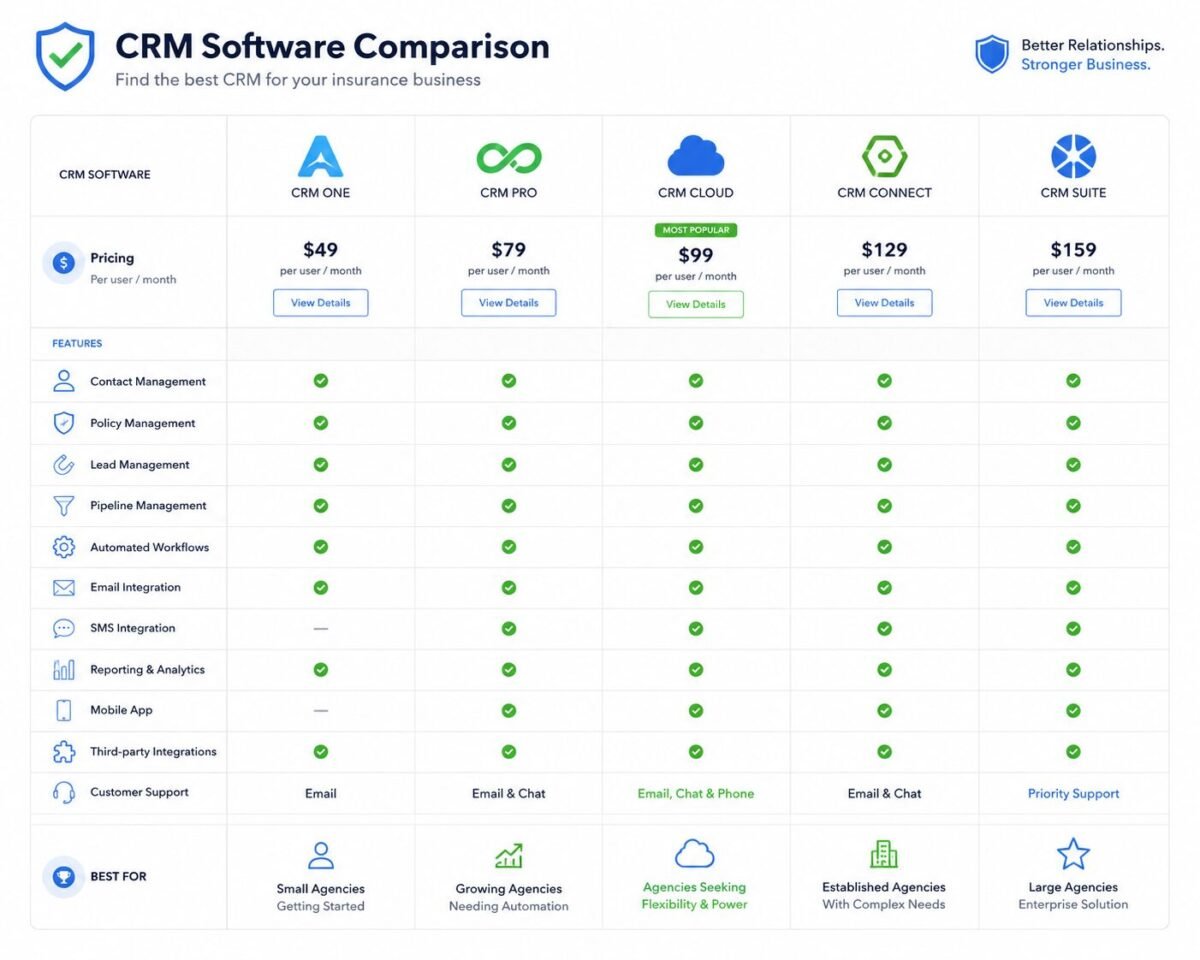
Quick-Glance Comparison: Best Insurance CRM Software at a Glance
| Platform | Best For | Starting Price | Standout Feature | Rating |
|---|---|---|---|---|
| AgencyBloc | Life & Health agents | $65/month | Automated commission tracking | ⭐ 4.7/5 |
| HawkSoft | Mid-size P&C agencies | Custom quote | Policy download automation | ⭐ 4.6/5 |
| Applied Epic | Large brokerages | $150+/user/month | Full AMS + CRM integration | ⭐ 4.5/5 |
| Radiusbob | Solo agents & small teams | Free / $34/month | Built-in auto-dialer | ⭐ 4.2/5 |
| Zoho CRM (Insurance) | Tech-savvy agencies | $14/user/month | Deep customization + AI tools | ⭐ 4.3/5 |
| Salesforce FSC | Enterprise insurers | $300+/user/month | Industry-leading scalability | ⭐ 4.4/5 |
Top Insurance CRM Software Reviewed in Detail
These aren’t affiliate rankings. Each platform below was evaluated against real insurance agency workflows — policy management depth, integration capability, support quality, and actual agent feedback. Here’s the breakdown.
Best for L&H
1. AgencyBloc — Best for Life & Health Insurance Agents
AgencyBloc was built exclusively for life and health insurance agencies, and that focus shows in every feature. The commission tracking module alone saves most agencies 8–12 hours per week in reconciliation time. It handles complex split commissions, bonus structures, and carrier statement imports automatically.
The automated workflow engine is genuinely impressive — you can build trigger-based sequences for open enrollment periods, Medicare AEP, and policy anniversaries without touching a line of code. It also integrates with major health carriers and CMS for Medicare agencies.
Pricing: Starts at $65/month for small teams; scales by number of policies managed.
Verdict: If you’re in L&H, this is the safest pick you can make. Nothing else matches its depth for benefit agencies.
Best for P&C
2. HawkSoft — Best for Mid-Size P&C Agencies
HawkSoft has quietly built one of the most loyal user bases in the independent agency space. Why? Because it actually listens to its customers — their feature roadmap is heavily influenced by user feedback submitted through their community portal. For P&C agencies managing personal and commercial lines, HawkSoft’s policy download automation (connecting directly with carriers via IVANS) dramatically cuts data-entry time.
The reporting suite is deep enough for agency owners who want to track retention rates, producer performance, and carrier concentration — without needing a data analyst.
Pricing: Custom per-agency pricing; request a quote on their website.
Verdict: The best overall CRM for independent P&C agencies that want reliability over flashiness.
Enterprise
3. Applied Epic — Best for Large Independent Agencies
Applied Epic is the gold standard for large brokerages — and it’s priced accordingly. It’s more than a CRM; it’s a full Agency Management System with CRM functionality baked in. According to Applied Systems, Epic is used by more than 60% of the top 100 U.S. insurance brokers. That adoption rate tells you something.
Implementation is complex and takes 3–6 months on average. But for agencies billing $5M+ in premium, the ROI of having a single system for client management, policy processing, accounting, and reporting is substantial.
Verdict: Overkill for small agencies. Indispensable for large ones.
Budget Pick
4. Radiusbob — Best Budget-Friendly Option
Radiusbob earns its place on this list for one specific audience: solo agents and small teams who need a CRM with a built-in auto-dialer and don’t want to pay enterprise prices. The free tier supports basic contact management, and paid plans (from $34/month) unlock the dialer, email campaigns, and basic workflow automation.
It’s not the deepest platform here — policy lifecycle management is limited compared to AgencyBloc or HawkSoft. But for a captive-turned-independent agent building their first book of business? It’s a perfectly reasonable starting point.
Verdict: Best “get started now” option. Expect to outgrow it within 2–3 years.
Most Flexible
5. Zoho CRM (Insurance Edition) — Best Customizable Platform
Zoho CRM isn’t purpose-built for insurance, but its Insurance Edition template and marketplace of integrations make it surprisingly capable. For tech-savvy agency owners who want to build exactly the workflow they need — without paying Applied Epic prices — Zoho’s low cost and high customizability is hard to beat.
The AI assistant (Zia) can flag stalled renewal pipelines and suggest follow-up timing. The downside? You’ll spend time configuring fields, modules, and automations that come pre-built in insurance-native platforms. Factor in that implementation time before comparing costs.
Verdict: Best for agencies with an ops-focused team member willing to invest setup time.
Pros and Cons of the Leading Insurance CRM Platforms
No platform is perfect. Here’s an honest breakdown of the trade-offs you’re actually making when you choose between the top options. The right choice depends almost entirely on your agency’s size, lines of business, and technical capacity.
Purpose-Built vs. Customized Generic CRMs: Real Trade-Offs
Pros: Purpose-Built (AgencyBloc, HawkSoft)
- Zero configuration — insurance workflows are built in
- Carrier integrations and IVANS connectivity included
- Support team understands insurance terminology
- Faster onboarding for agency staff
- Renewal and compliance workflows pre-configured
Cons: Purpose-Built
- Higher per-seat cost than generic CRMs
- Less flexible for non-standard workflows
- Vendor lock-in is real — migration is painful
- Some platforms lack modern UI/UX polish
Pros: Generic CRMs (Zoho, Salesforce)
- Lower starting cost
- More integration options across all business tools
- Better for cross-department use (sales + marketing)
- Frequently updated with new features
Cons: Generic CRMs
- Requires significant customization for insurance
- No native policy lifecycle management
- Support staff unfamiliar with insurance nuances
- Customization costs can exceed specialized platforms
When Specialized Always Wins
If your agency does more than $500K in annual premium and you have at least 3 full-time staff, the answer is almost always a purpose-built platform. The time your team wastes configuring a generic CRM to behave like an insurance CRM — and the errors that slip through during that process — will cost you more than the price difference within the first 18 months. The math is not close.
How Much Does Insurance CRM Software Actually Cost?
Let’s talk real numbers. The sticker price is rarely the whole story with any CRM, and insurance platforms are no exception. There are three layers of cost you need to evaluate before signing anything.
Pricing Models and What They Actually Mean
Insurance CRMs typically fall into one of three pricing structures:
- Per-user/month: Common with Zoho and Salesforce ($14–$300+). Scales with headcount.
- Per-policy or per-client: Common with AgencyBloc. Scales with your book of business size.
- Flat agency fee: HawkSoft and similar platforms charge a flat monthly rate regardless of user count — great for growing teams.
Budget range summary: Free–$50/month (Radiusbob, Zoho free tier) → $50–$200/month (AgencyBloc, mid-tier Zoho) → $200+/month (Applied Epic, Salesforce FSC).
Hidden Costs Nobody Talks About
This is where agencies get burned. The platforms themselves are just the starting point. Watch for:
- Onboarding and data migration fees: Applied Epic implementations can cost $10,000–$50,000+ depending on agency size
- Training costs: Staff training for complex platforms runs $1,000–$5,000 per implementation
- Integration fees: Connecting to IVANS, rating engines, or e-signature tools often carries per-integration charges
- Storage overages: Platforms that store policy documents often charge for storage beyond base limits
- Support tiers: Premium support (phone vs. email-only) sometimes costs extra
Always ask vendors for a “total cost of ownership” estimate over 3 years — not just monthly pricing. You’ll be surprised what that number looks like.
The “Book of Business” Problem — A Real-World Scenario
Numbers tell one story. A real agency situation tells another. Here are two cases that illustrate exactly what choosing right — or wrong — looks like in practice.
Success Case
Midwest P&C Agency: $140K Recovered in Year One
A 7-person independent agency in Ohio was running on AMS360 for policy management and a shared Google Sheet for client follow-up. Renewal retention sat at 71% — 17 points below the industry average. After switching to HawkSoft and configuring automated 60/30/15-day renewal sequences with producer task assignments, their retention jumped to 89% within 14 months.
The math: their average policy premium was $1,200, and they were losing roughly 130 policies annually to non-renewals that slipped through. Recovering 60% of those — about 78 policies — at a 12% commission rate translated to roughly $140,400 in retained annual commission. The CRM cost them $4,800 per year. ROI: 2,825%.
Key Lesson: Automated renewal workflows don’t just save time — they directly protect commission revenue at a calculable rate.
Failure Case
Texas L&H Brokerage: $80K Wasted on the Wrong Platform
A 12-person group benefits brokerage in Dallas decided to go with Salesforce Sales Cloud after being sold on its brand reputation and customization potential. They hired a Salesforce consultant at $175/hour to build out insurance-specific workflows. Eighteen months and $62,000 in consulting fees later, they still didn’t have automated commission reconciliation or a working renewal alert system.
They eventually abandoned the implementation and migrated to AgencyBloc — which had those features built in at $65/month. Total cost of the Salesforce experiment: over $80,000 when you include licensing, consulting, staff time, and lost productivity during the transition.
Key Lesson: Brand prestige doesn’t equal industry fit. A purpose-built platform at a fraction of the cost would have solved the problem on day one.
How to Choose the Right Insurance CRM for Your Agency
There’s no universally “best” platform — there’s only the best platform for your specific situation. Here’s a practical 5-step framework that actually works.
Steps 1–3: Audit, Match, and Integrate
Step 1 — Audit your current workflow gaps. Before you look at a single CRM demo, sit down and map where clients are falling through the cracks. Is it at the renewal stage? At lead follow-up? At onboarding? Your biggest pain point should drive your evaluation criteria.
Step 2 — Match CRM type to your lines of business. L&H agencies should start with AgencyBloc. P&C-heavy agencies should evaluate HawkSoft or Applied Epic. Multi-line commercial agencies may need a hybrid or enterprise solution.
Step 3 — Map your integration requirements before demo day. List every tool your agency currently uses — rating engines, email platforms, phone systems, e-signature tools, carrier portals. Ask every vendor directly: “Show me how this connects to [your tool].” Not “can it integrate” — show me the live integration. That question alone will eliminate half the options.
Steps 4–5: Evaluate Support and Always Trial First
Step 4 — Prioritize onboarding support quality over features. A CRM with 80% of the features you need but excellent onboarding support will outperform a perfect-feature platform with poor implementation help. Ask vendors: “How many dedicated hours does our onboarding include?” and “Do you assign a named account manager?” If the answers are vague, that’s a red flag.
Step 5 — Require a free trial before committing. Every serious platform offers at least a 14-day trial. Run actual client data through it — or a sample set. Have your team use it for real tasks. The gap between a polished demo and day-to-day usability is often enormous. Don’t sign a 12-month contract without the trial. If you want to explore more about how CRMs fit into broader InsurTech strategy, read our full HubSpot review and platform comparisons on the main site.
“The best CRM is the one your team actually uses. A sophisticated platform with 10% adoption is worse than a simple one with 90%.”
Real-World Scenarios: Success vs. Failure
Beyond the individual platform case studies above, here’s what the broader data tells us. According to Forbes Advisor research on CRM adoption, companies that use a CRM see an average sales increase of 29% and productivity gains of 34%. In insurance specifically, the delta between agencies using purpose-built CRMs and those on generic tools — or worse, spreadsheets — is even wider due to the complexity of recurring policy management.
The agencies consistently outperforming their peers on retention share three traits: automated renewal workflows, consistent touchpoint sequences, and CRM data that’s actually up to date. The last one sounds obvious, but data hygiene is where most implementations quietly fail. A CRM with stale contact info, missing policy dates, and untouched tasks is just an expensive address book.
What Separates Top-Performing Agencies
When examining the agencies in the top quartile of retention rates, a clear pattern emerges. They treat their CRM as a living system — not a static database. That means weekly pipeline reviews, automated data sync from carrier downloads, and regular purging of dead leads. The technology isn’t the differentiator. The discipline around using it is.

Frequently Asked Questions
What is the best CRM for independent insurance agents?
For most independent agents, the answer depends on primary lines of business. If you’re in life and health, AgencyBloc is the clearest recommendation — it handles commission tracking, benefit enrollment workflows, and carrier integrations out of the box. For P&C-focused independents, HawkSoft offers the strongest combination of policy download automation and retention-focused features. Solo agents on a tight budget should start with Radiusbob (free tier available) and migrate to a fuller platform once their book of business grows past 100–150 active clients. The worst move is forcing a generic sales CRM like basic HubSpot into an insurance workflow — you’ll spend more time configuring it than selling.
Can I use HubSpot or Salesforce as an insurance CRM?
You can — but you should go in with realistic expectations. HubSpot’s free and Starter tiers are genuinely capable for lead management and email sequences, but they have no native concept of a “policy,” “renewal date,” or “carrier.” You’d need custom properties, custom pipelines, and either a developer or a third-party connector to make it feel like an insurance tool. Salesforce Financial Services Cloud (FSC) is a different story — it was purpose-built for financial services including insurance, and it handles client hierarchies, policy objects, and referral tracking natively. But FSC starts at $300+/user/month and requires significant implementation investment. For most independent agencies, the cost-benefit math doesn’t favor Salesforce unless you’re billing $10M+ in premium annually.
How does an insurance CRM differ from an Agency Management System (AMS)?
This is one of the most common points of confusion in the industry. An Agency Management System (AMS) is the operational backbone of an agency — it handles policy issuance, billing, carrier downloads, accounting, and regulatory compliance. Think of it as the back-office system. A CRM, by contrast, focuses on the client-facing side: leads, pipelines, communication history, follow-up sequences, and relationship management. Some platforms — notably Applied Epic — blur this line by combining both functions in one system. Others, like AgencyBloc, lean CRM-first with some AMS capabilities. Most agencies end up using both: an AMS like AMS360 or Vertafore for policy processing and a CRM for client relationship management. The full definition of what is insurance CRM covers this distinction in much more detail.
Is there a free insurance CRM software worth using?
Yes, with caveats. Radiusbob offers a genuinely functional free tier that includes contact management, basic pipeline tracking, and limited email tools — it’s the most insurance-aware free option available. Zoho CRM’s free plan supports up to 3 users and includes basic automation, but requires custom configuration to handle insurance-specific workflows. HubSpot Free is excellent for lead tracking and email but isn’t meaningfully useful as a standalone insurance CRM without paid add-ons. The honest answer: free tiers work fine as a starting point for a solo agent or a brand-new agency, but the best insurance CRM software at any meaningful scale requires a paid plan. The ROI on even a $65/month platform — if it saves one policy renewal per month — typically justifies the investment within the first 30 days.
Ready to Stop Losing Renewals?
The best insurance CRM software pays for itself — often within a single retained policy. Start with a free trial of AgencyBloc or HawkSoft, run your actual workflow through it for 14 days, and make the decision with real data in hand.Explore More InsurTech Reviews →





Leave a Reply