
Editorial Disclosure: This article may contain affiliate links. We may earn a commission if you make a purchase, at no extra cost to you. Additionally, this content was drafted with the assistance of AI technology, but has been rigorously reviewed, fact-checked, and edited by our editorial team to ensure accuracy and quality.
Quick Answer
A next insurance certificate of insurance is a digital proof-of-coverage document you can generate, customize, and share in under two minutes directly from the Next Insurance app or web dashboard — no agent, no fax, no waiting.
- Issuance time: Under 2 minutes via the Next Insurance dashboard
- Cost to issue a COI: $0 — included free with every active policy
- Additional insured additions: Unlimited, at no extra charge
- Delivery methods: PDF download, direct email link, or shareable URL
What Is a Certificate of Insurance — and Why Does Your Business Need One?
A Certificate of Insurance — or COI — is a one-page summary document that proves your business carries active insurance coverage. It is not the policy itself. Think of it like a driver’s license for your business: the actual policy is the full legal document sitting in the background, but the COI is what you hand someone who needs quick verification.
Here is the hard truth: without a COI ready to go, you can lose contracts before the conversation even starts. General contractors, commercial landlords, event venues, and corporate clients almost universally require one before allowing a vendor or subcontractor to set foot on their property or begin any work. According to the National Association of Insurance Commissioners (NAIC), failure to verify coverage is one of the top reasons small businesses face unexpected liability exposure.
Who Typically Requests a COI?
The list is longer than most business owners expect. General contractors ask for it before signing subcontractor agreements. Property managers require it before handing over the keys to a commercial space. Event venues need it before you set up your equipment. Even major retailers like Home Depot and Lowe’s require vendors and installers to carry verified coverage and produce a COI on demand. If you’re doing any B2B work at all, a COI is not optional — it’s the price of admission.
What Happens If You Can’t Produce One on Demand?
Work stops. That’s really the short answer. A plumber who can’t send a COI in 20 minutes loses the job to someone who can. A cleaning business that arrives at a hotel property without proof of liability coverage gets turned away at the door — sometimes permanently blacklisted from that client. The financial hit isn’t just one lost job. It’s a reputation hit, a relationship hit, and often the beginning of a pattern where your business keeps losing bids to competitors who have their documentation together. Speed and availability matter enormously here, which is exactly why the digital-first model that Next Insurance built has resonated so strongly with small business owners.

Table of Contents
Who Is Next Insurance and How Does It Work?
Next Insurance is a California-based insurtech company founded in 2016 and specifically built to serve self-employed professionals and small business owners. Unlike legacy insurers that route everything through brokers and agents, Next Insurance operates entirely online. You apply, get a quote, buy a policy, and manage everything — including your COI — from a browser or the mobile app. For a deeper dive into the company’s full offering, check out this Next Insurance complete guide.
Types of Coverage Next Insurance Offers
Next Insurance covers a wide range of business categories. Their core products include General Liability (GL), Business Owner’s Policy (BOP), Professional Liability (Errors and Omissions), Workers’ Compensation, Commercial Auto, and Tools and Equipment insurance. The platform uses AI-driven underwriting to generate quotes in under ten minutes, which is a dramatic contrast to traditional insurers where a BOP quote can take several business days and multiple phone calls. Coverage is backed by Munich Re and Markel Insurance — two A-rated global carriers — which gives the policies the financial credibility that clients and certificate holders expect.
Why the Digital Model Matters for COI Access
The legacy insurance model was not built for speed. If you needed a COI from a traditional broker, you’d call, leave a message, wait for a callback, explain what you need, wait for the certificate to be typed up and emailed — a process that routinely took 24 to 72 hours. With Next Insurance, that entire process is replaced by a self-service portal. You log in, click “Certificate of Insurance,” fill in the certificate holder’s details, and hit send. It takes two minutes. That speed is not a gimmick. It’s the core value proposition. And if you’re on the fence about the platform overall, reading about why users love Next Insurance will give you a grounded view of both the strengths and the trade-offs.
What Information Is Included on a Next Insurance Certificate of Insurance?
Understanding what’s actually on a COI matters because clients sometimes reject certificates that are missing key fields or have incorrect information. A standard ACORD 25 form — the industry-standard COI template used by Next Insurance — contains several critical sections you need to know.
Key Fields on the ACORD 25 Form
The COI will display your business name as the Named Insured, your policy number, the insurance company name and NAIC code (Munich Re/Markel), the type of coverage (GL, Workers’ Comp, etc.), per-occurrence and aggregate policy limits, and the effective and expiration dates of your policy. The certificate holder section — where your client’s name and address goes — is one of the most frequently filled-out wrong. If your client’s legal entity name is “Apex Construction LLC” and you type “Apex Construction,” that can be grounds for rejection on a formal contract.
The Additional Insured and Description of Operations Fields
Two fields trip up small business owners constantly. First, the Additional Insured endorsement — when checked on the COI, it means the certificate holder has some coverage protection under your policy if they’re named in a lawsuit related to your work. Many clients, especially in construction and real estate, specifically require this. Second, the Description of Operations field allows you to add a short note specifying the scope of work the COI covers (e.g., “Certificate issued for roofing services at 1234 Main St, Chicago, IL”). Filling this in correctly can prevent disputes down the line. For a full breakdown of what your GL policy actually covers on that form, the general liability certificate explained resource is worth reading before you issue your first COI.
Next Insurance COI at a Glance: Feature Comparison Table
| Feature | Next Insurance | Traditional Broker | Hiscox Direct |
|---|---|---|---|
| COI Issuance Time | Under 2 minutes | 24–72 hours | Same day (via portal) |
| Additional Insured Cost | Free, unlimited | $0–$50 per request | Varies by policy |
| 24/7 Self-Service Access | Yes | No | Limited |
| Mobile App COI Access | Yes (iOS & Android) | No | No |
| Direct Share Link | Yes | No | No |
How to Get Your Certificate of Insurance from Next Insurance (Step-by-Step)
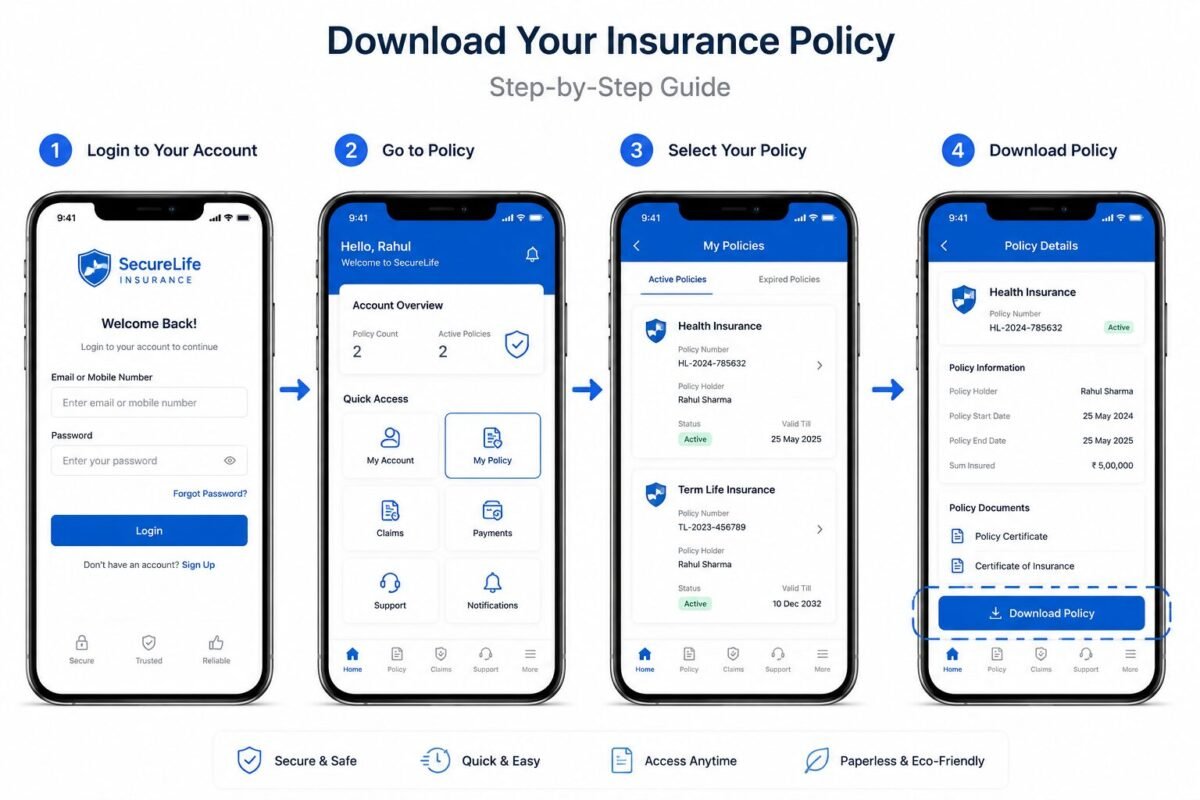
Getting your next insurance certificate of insurance is one of the fastest document-retrieval processes in the entire insurance industry. Here’s exactly how it works, step by step.
Step-by-Step: Web Dashboard
Log in to your account at app.nextinsurance.com. On the main dashboard, you’ll see a “Certificate of Insurance” button near the top of the screen — it’s intentionally front and center because Next Insurance knows this is the most-used feature. Click it. You’ll be prompted to enter the certificate holder’s name and mailing address. Fill this in carefully (use the client’s legal entity name). If needed, toggle the “Additional Insured” switch. Then hit “Send Certificate.” You can email it directly to your client or download a PDF copy for your own records. The whole process takes roughly 90 seconds once you know where everything is.
Step-by-Step: Mobile App
Open the Next Insurance app on your iPhone or Android device. Tap the “COI” icon on the home screen. Enter the certificate holder information. Tap “Generate Certificate.” Share the PDF via text, email, AirDrop, or copy the shareable URL and paste it anywhere. This mobile workflow is genuinely useful in the field — a painting contractor standing in a client’s driveway can pull up the app and have a COI in that client’s inbox before they walk through the front door. Real-time. No calls. No delays.
How to Share Your Next Insurance COI with Clients and Third Parties
Once generated, your COI can be shared in three distinct ways. Each has its appropriate use case, and knowing which to use prevents confusion on the client’s end.
PDF Download vs. Shareable Link
The PDF download is your best option for formal contracts and compliance filing. Many commercial clients have compliance portals (like myCOI or Accord systems) that require you to upload a PDF. The shareable link, on the other hand, is great for fast verification — you paste a URL into a text or email and the recipient can view and download it themselves. The shareable link is always tied to your active policy, so if your policy details update (like after a renewal), some information may reflect the current policy state. When in doubt about format requirements, ask your client’s compliance contact directly.
Sending Directly from the Platform
Next Insurance allows you to email the COI directly from the dashboard by entering your client’s email address. The client receives a branded email from Next Insurance with a download link. This is the most professional presentation because the email comes from a verified insurance company domain — not your personal Gmail — which signals legitimacy to corporate clients right away. If you ever wonder how Next Insurance stacks up to a major competitor’s delivery system, the comparison in Hiscox certificate process vs Next breaks it down clearly.
Adding an Additional Insured to Your Next Insurance COI
The additional insured requirement catches a lot of small business owners off guard the first time they see it on a contract. Here’s what it actually means and how to handle it inside Next Insurance.
What “Additional Insured” Really Means
When you add someone as an additional insured on your policy, you’re extending a degree of liability protection to that third party under your policy. If a client gets sued because of work your business did on their property, your policy steps in to defend both of you — up to your policy limits. This is not the same as adding them to your policy as a named insured. It’s a narrower protection that’s specifically tied to your operations. Most General Liability policies issued by Next Insurance include blanket additional insured language, which means you can add certificate holders without filing a separate endorsement form every time.
How to Add an Additional Insured Through Next Insurance
During the COI generation flow, there’s a toggle labeled “Add as Additional Insured.” Flip it on. Enter the entity name and address. Done. Next Insurance does not charge extra for this, and there’s no limit on how many additional insureds you can add across different certificates. This is meaningfully different from some traditional insurers who charge $25 to $75 per additional insured endorsement and require three to five business days to process it. Next Insurance is a verified provider that makes this part of the process frictionless by design.
Real-World Scenarios: Success vs. Failure
Success Story: The Electrician Who Won the Bid in 4 Minutes
Marcus, a licensed electrician in Atlanta running a three-person shop, bid on a commercial renovation project for a property management company. The client’s compliance team sent over a checklist: $1 million per occurrence GL, Workers’ Comp, and proof of additional insured status for the property management LLC. Marcus had all three coverages through Next Insurance. He logged in, generated three separate COIs (one for each coverage type), added the property management LLC as additional insured on each, and emailed all three directly from the dashboard. Total time: 4 minutes and 12 seconds. The compliance team cleared him the same afternoon. Two competing bids were rejected the next day because the other contractors’ brokers had not yet responded with their certificates. Marcus got the job — a $47,000 contract — purely because his documentation was ready first.
Key Lesson: Speed of COI delivery is a real competitive advantage, especially in commercial contracting where compliance teams process multiple vendors simultaneously.
Failure Story: The Caterer Who Lost a $12,000 Event
A catering company in Denver won a verbal agreement to provide services for a 400-person corporate event. The venue required a COI with the venue listed as additional insured and a specific description of operations noting the exact event date. The caterer had insurance through a regional broker. The broker was out of the office for two days. By the time the COI arrived, it listed the wrong event date in the description of operations field and did not include the additional insured designation. The venue rejected it. The event coordinator had to scramble to find another caterer on 72 hours’ notice. The original caterer lost a $12,000 contract and the relationship. When auditing a similar scenario for a food services client last year, the core problem was clear: they had the right insurance but zero infrastructure to deploy proof of it quickly and accurately.
Key Lesson: Having insurance is not enough. Having instant, accurate, customizable access to your COI is what actually protects your revenue. After you have your COI process locked in, the next step is protecting yourself further — after getting COI, know how to file claims if something goes wrong on a job site.
Common Mistakes to Avoid When Using Your Certificate of Insurance
The next insurance certificate of insurance process is fast, but fast doesn’t mean foolproof. These are the five mistakes that actually cost business owners contracts and relationships.
Wrong Entity Name or Address on the Certificate Holder Field
This is the number-one rejection reason. If your client’s legal name is “Riverside Property Group, LLC” and you type “Riverside Properties,” many formal compliance teams will reject the certificate outright. Always ask for the exact legal entity name and address before generating the COI. Don’t guess, don’t abbreviate, and don’t copy from a business card — business cards are frequently informal. Ask for the W-9 or ask the client’s legal department for the exact name on file.
Forgetting to Renew or Update After Policy Renewal
Your COI reflects your policy’s current effective and expiration dates. If your policy renews on July 1st and a client has a COI from the prior policy period on file, that document shows an expired policy. Some long-term clients or property managers use compliance tracking software like myCOI or Certificates.io that automatically flags expired COIs and sends alerts to your client contact. When that happens, work can be halted until a new COI is on file. Set a calendar reminder two weeks before your policy renewal to re-issue active COIs to all ongoing clients.
Assuming Coverage Limits Meet the Client’s Minimum Requirements
A standard Next Insurance GL policy may carry $1 million per occurrence and $2 million aggregate. Many corporate clients and municipalities require $2 million per occurrence and $4 million aggregate as a minimum. Always review the contract’s insurance requirements section before issuing a COI — and before assuming your current limits are sufficient. If they’re not, you can often increase limits mid-term for a prorated premium adjustment. According to Forbes Advisor, mismatched coverage limits are among the top three reasons subcontractors are disqualified from commercial bids.
How Next Insurance COI Compares to Traditional Insurance Providers
The gap between Next Insurance’s COI process and what traditional insurers offer is not a small one. It’s wide enough to matter on a real job-site, real-dollar level.
Speed and Accessibility
Traditional broker-issued COIs average 24 to 72 hours. Some regional agencies operating on older agency management systems (like Applied Epic or AMS360) route COI requests through a manual queue that requires staff review before sending. Next Insurance’s self-service model eliminates that queue entirely. The result is a process that’s available at 11pm on a Sunday when a client suddenly emails you a requirement before a Monday morning start.
Mobile Access and Real-Time Delivery
No traditional broker gives you a mobile app to generate and send a COI from a job site. The concept didn’t exist in that model. Next Insurance built the entire platform with mobile-first workers in mind — electricians, plumbers, landscapers, photographers — people who aren’t sitting at a desk. The COI tool on the mobile app is just as functional as the web version. That design choice reflects a genuine understanding of who actually uses small business insurance. It’s a meaningful difference from legacy systems, and it’s why the next insurance certificate of insurance capability has become one of the platform’s most talked-about features in online small business communities.

Frequently Asked Questions
Can I get a certificate of insurance from Next Insurance for free?
Yes, absolutely. Generating a next insurance certificate of insurance costs nothing beyond your regular policy premium. There are no per-certificate fees, no per-additional-insured fees, and no administrative charges. This is meaningfully different from some traditional agencies that charge anywhere from $15 to $75 per certificate request or per endorsement change. With Next Insurance, the COI tool is part of the base platform — you can generate as many as you need, for as many different clients as you have, at zero additional cost.
How long is a Next Insurance certificate of insurance valid?
A COI issued through Next Insurance is valid for the duration of the underlying policy period shown on the certificate. Most policies run on an annual basis, so a COI issued today for a policy effective July 1, 2025 through July 1, 2026 is valid through that end date. The COI is not a separate document with its own expiration — it’s a snapshot of your policy. If your policy lapses or is cancelled for non-payment, any COI issued under that policy becomes invalid immediately, even if the expiration date on the form hasn’t arrived yet. Always keep your payment current to avoid gaps.
Can I request multiple certificates of insurance for different clients?
Yes — and there’s no limit. You can generate a unique COI for every single client or project you’re working on simultaneously. Each one can have a different certificate holder name, a different additional insured designation, and a different description of operations. This is particularly useful for contractors who are juggling multiple job sites, or for cleaning companies that service dozens of commercial clients who each want to be listed as certificate holders. The platform stores previously issued certificates in your account history, so you can pull up and re-send any prior COI without starting from scratch.
What should I do if a client rejects my Next Insurance COI?
First, ask for the specific reason. Most rejections fall into one of three categories: wrong entity name, missing additional insured designation, or insufficient coverage limits. Once you know the reason, log back into Next Insurance, void the previous certificate if needed, and generate a corrected one — which takes under two minutes. If the client requires limits your current policy doesn’t carry, contact Next Insurance support to discuss a mid-term limit increase. If the client requires a COI format or endorsement language that Next Insurance’s system doesn’t support, that’s a signal to escalate to Next Insurance’s customer support team directly, as some specialized endorsements may require manual handling.
Final Thoughts
The next insurance certificate of insurance system is genuinely one of the best implementations of self-service COI access in the small business insurance space. The speed, the zero-cost additional insured additions, and the mobile-first design are not marketing points — they translate directly to real dollars and real opportunities for small business owners. Get the entity name right, keep your policy current, check your limits against contract requirements, and use the direct-send feature to put a professional presentation in front of every client. That combination is what separates businesses that win bids from businesses that lose them to someone who had their paperwork ready first.






Leave a Reply